File Transfer and Networking
5 files
-
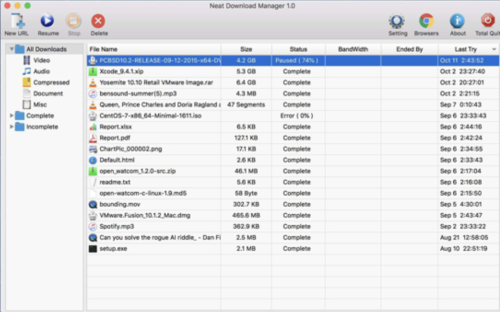
Uses an optimized Dynamic Segmentation Algorithm.
Speeds up your Downloads up to your total available Bandwidth.
Organizes your Downloads based on Download Status (Complete, Incomplete) And File Type (Video, Document , ...)
Supports HTTP, HTTPS and FTP Protocols.
Supports HTTP Proxy and SOCKS Protocol.
Supports HTTP Authentication and Proxy Authentication (Basic, Digest, NTLM)
Has Pause/Resume Capabilities and can resume crashed Downloads.
Has Browser Extension that can send Download Links to it and helps you download Video/Audio from any WebSite.
Lets you set Bandwidth Limit on your Downloads even when Download is in progress.
Lets you set maximum Connection Number on your Downloads even when Download is in progress.
Can download all .ts files of an HLS video and at the end merge all segments into a single .ts file.
Can Renew expired Downloads.
Works with Drag and Drop, just for Mac
- 12 Downloads
-
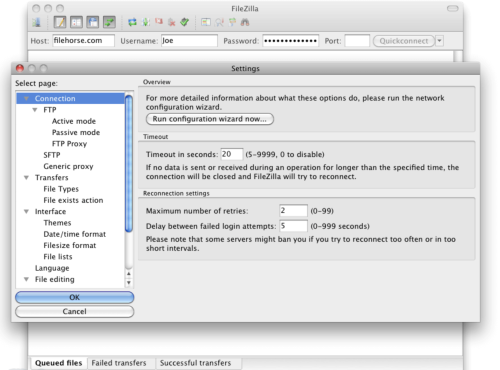
FileZilla for Mac is a popular and feature-rich free FTP client that offers users of all technical levels access to a wide range of features and tools for managing and transferring files over the local networks and internet via the popular FTP transmission protocol and its numerous variations.
This software is available for Mac computers as a native app and is designed to enhance the workflow of home users, students, developers, and anyone else who needs to transfer files securely and efficiently.
Today, this app is primarily used for uploading, downloading, and managing files on remote internet servers, but it can also be easily used for FTP connection between any supported modern devices inside the local network.
It fully supports various file transfer protocols such as FTP, SFTP, and FTPS, ensuring secure connection, reliable file transfers, and an easy way to manage a large number of files and directories, with no limits being placed on file size or transfer speeds.
The software also offers advanced features like synchronized directory browsing, directory comparison, remote administration, full IPv6 support, remote search and file editing, extensive local logging, and drag & drop support, making it an indispensable tool for managing files across different platforms.
In addition to Mac, this app can be used on Windows and Linux computers, making it one of the most versatile free FTP clients available on the market.
Main Features
Comprehensive FTP Client – Complete supports FTP, SFTP, and FTPS protocols for secure file transfers.
IPv6 Support – Fully compatible with IPv6, ensuring future-proof connectivity.
Synchronized Directory Browsing – Empowers users to simplify directory navigation when managing multiple devices.
Directory Comparison – Easily compare the contents of local and remote directories, highlighting differences in file size and modification time.
Remote Administration – Manage system files, directories, and services remotely.
Permissions System – Manage remote security access with user and group authentication.
Large File Support – Reliably transfers larger than 4GB with no speed limits.
Custom Speed Limits – Set custom speed limits for file transfers to manage real-time bandwidth usage.
Installation and Setup
To install this app on a Mac, users can download the Intel or ARM installer version from the official website or secure FileHorse servers and follow a few simple on-screen installation prompts.
The entire installation process is straightforward and requires minimal technical expertise, enabling even complete novices to get this app up and running in a mere minute.
What`s New in latest version 2026
Improved FTP, FTPS, and SFTP connection stability.
Enhanced transfer speed optimization for large files.
Updated TLS encryption handling for stronger security.
Improved site manager with clearer connection profiles.
Better handling of long file paths and large directories.
Enhanced resume support for interrupted transfers.
Improved compatibility with modern server configurations.
Refined user interface responsiveness on Windows and macOS.
Updated language files and localization support.
Bug fixes and overall stability improvements.
How to Use
Once inside the app, users can configure this powerful FTP client by specifying a remote IP address, and remote client login details, and connecting to their FTP account on the server.
Connections can be made either with the Quick Connect tool or the Site Manager feature that allows users to set up their most often-used connection parameters.
Once connected, users can navigate through both local and remote directories, upload and download files, and manage permissions using the software's intuitive interface.
User Interface
The user interface of this app is designed to be user-friendly and intuitive, promoting four main on-screen modules. The top of the app is home for connection status listing where users can access all their currently active connection data or error codes.
Below are two full sets of file management modules, and on the bottom is a transfer listing module that showcases what files are currently in status of transfer (with three tabs for Queued, Failed, and Successful transfers).
The app also hosts a wide variety of other important tools, such as directory bookmarks, speed limiter, search tool, directory comparison tool, and many others.
- 19 Downloads
-
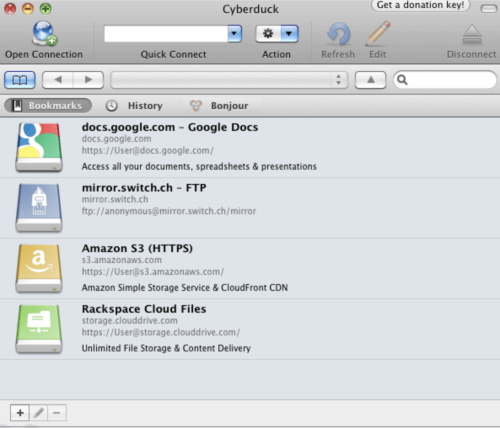
Cyberduck for Mac is an open source FTP, SFTP, WebDAV, Cloud Files and Amazon S3 browser for the Mac. It features an easy to use interface with quickly accessible bookmarks.
The outline view of the browser allows to browse large folder structures efficiently and you can quickly preview files with Quick Look.
To edit files, seamless integration with several external editors makes it easy to change content quickly. Both Amazon CloudFront and Cloud Files from Rackspace can be easily configured to distribute your content in the cloud.
Many macOS core system technologies such as Spotlight, Bonjour and the Keychain are supported and a large number of translations makes you feel at home.
Features and Highlights
Connecting to every server
With an easy to use interface, connect to FTP (File Transfer Protocol), SFTP (SSH Secure File Transfer), WebDAV (Web-based Distributed Authoring and Versioning), Amazon S3, Google Cloud Storage, Windows Azure, Rackspace Cloud Files and even Google Docs.
Edit any file with your preferred editor
To edit files, seamless integration with any external editor application makes it easy to change content quickly. Edit any text or binary file on the server in your preferred application.
Distribute your content in the cloud
Both Amazon CloudFront and Akamai content delivery networks (CDN) can be easily configured to distribute your files worldwide from edge locations. Connect to any server using FTP, SFTP or WebDAV and configure it as the origin of a new Amazon CloudFront CDN distribution.
Amazon S3 for the rest of us
Browse Amazon Simple Storage Service like your harddisk. Supporting the latest and greatest additions to the S3 storage options. Define website endpoints, enable access logging, configure storage class, encryption and bucket location.
Manage your Google Docs
Convert uploads to Google Docs format and Optical Character Recognition (OCR) for image uploads. Define access control lists to share documents with other users using Google login credentials.
And many more (First class bookmarking, Browse with ease, Transfer anything, Advanced SSH features, Integration with system technologies).
PROS
User-Friendly Interface – Simple and intuitive design.
Supports Multiple Protocols – FTP, SFTP, WebDAV & more.
Seamless Cloud Integration – Works with AWS, Google Drive.
Free & Open Source – No cost with active community support.
Bookmark & Transfer Queue – Easy file management tools.
CONS
Slower Performance – Can lag with large transfers.
Frequent Connection Drops – Stability issues at times.
Limited Automation – No built-in scheduling feature.
Annoying Donation Pop-ups – Requests for contributions.
No Built-in File Editing – Requires external editors.
Note: Requires 64-bit processor.
- 19 Downloads
-
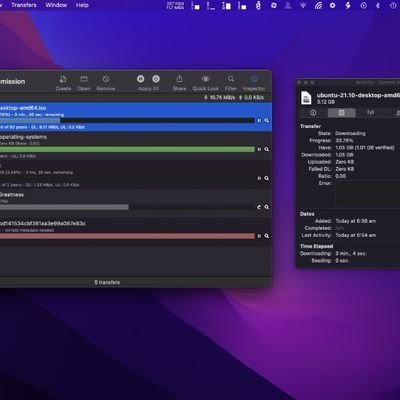
Transmission is a free file-sharing program developed to be a desktop torrenting client to help users share files over the internet. This open-source solution offers a fast and lightweight experience that comes with a clean and simple user interface that will be easy to learn for newcomers.
Despite its small footprint, there is no lack of features with Transmissions as it offers plenty of options and customization as its contemporaries like Vuze or Xtorrent. It also supports both torrent files and magnet links downloaded from across all online sources for improved compatibility and seamless operation.
Torrent made simple
Apart from direct downloads from file-sharing sites, peer-to-peer torrenting is the preferred way to share files over the web for most people. Some of the biggest reasons why is the ease of use and because it's free to get started with. The are plenty of choices in the market today but if you're looking for one that's easy on your system resources, Transmission is one option to consider.
Transmissions are as clean and straightforward as they come, and that is not really a bad thing as it just works without much setup needed. It still comes with all the bells and whistles you've come to expect from a torrent client like advanced download queueing and traffic control. Transfers are also encrypted to ensure your data traffic is anonymous and untraceable.
What's more, recent updates have included native support for the newest BitTorrent v2 protocol for greater security, as well as hybrid torrents for backward compatibility. It's not without its shortcomings, though, as you don't get built-in proxy support with it. Another is that it can be a bit difficult to manage multiple active torrents at the same time—a common scenario for most users.
A solid option
To conclude, if you're looking for a new torrent client and your main priority is speed and ease of use, Transmission is a solid option you should look into. It gets the basics right and will meet the needs of most users. There are some missing features here and there, but if you don't mind those omissions, go and give this one a try now. Recommended.
- 21 Downloads
-
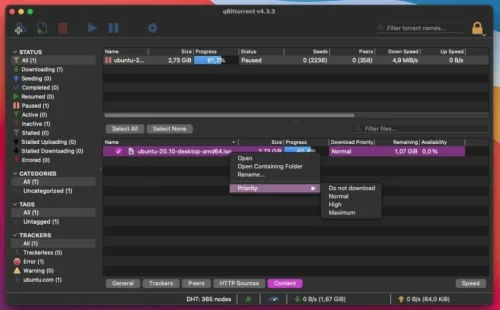
qBittorrent is a free software application designed for Mac users that facilitates file sharing and peer-to-peer networking. It is categorized under Internet & Network, specifically in the File Sharing & Peer to Peer subcategory.
This application offers a user-friendly interface, making it accessible for both novice and experienced users. With its lightweight design, qBittorrent allows for efficient downloading and uploading of files, ensuring a smooth user experience.
The program supports various protocols and provides features such as a built-in search engine, torrent creation, and bandwidth scheduling. Additionally, qBittorrent includes a web interface for remote management, making it convenient for users who wish to control their downloads from different devices. Overall, qBittorrent stands out as a robust and reliable tool for file sharing on the Mac platform.
- 18 Downloads
Blog Entries
-
- 0 Comments
- 152 Views
-
- 0 Comments
- 118 Views
-
- 0 Comments
- 140 Views
-
- 0 Comments
- 124 Views
-
- 0 Comments
- 128 Views




Links
-
- 0 Comments
-
- 0 Comments
- 1 Total Hits
-
- 0 Comments