


- 0 replies
Featured Content
Top content from across the community, hand-picked by us.

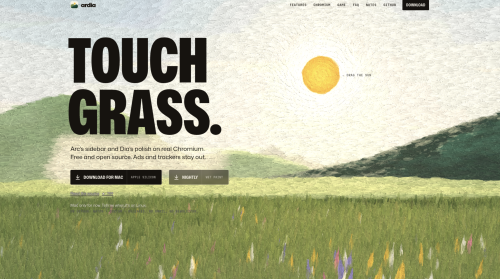
Ardia Browser
A free, open source Chromium browser for Mac with an Arc style sidebar.Ardia is a free, open source browser for Apple silicon Macs that pairs an Arc style sidebar with a polished interface on real Chromium. It ships with uBlock Origin built in, supports Chrome Web Store extensions, and can import your Arc data including Spaces. It also offers a Little Arc style quick window and encrypted iCloud Drive sync.
- 0 replies
Featured by eivindsimensen
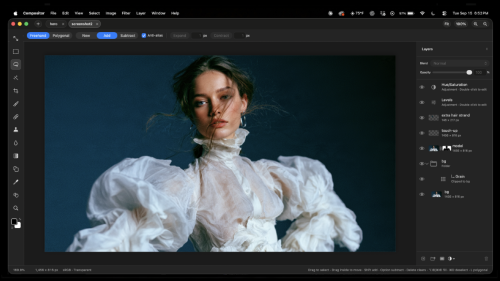
Compositor
All the tools you need forprofessional compositingAdobe Photoshop costs too much and tools like GIMP don’t feel familiar enough for me to stay in flow. That’s why I built Compositor.The goal was to create a full-featured image editor that is completely free and open source. I used to use Photoshop for compositing and post-processing, so Compositor is built around that workflow - with the tools needed to create a pixel-perfect final image.Because it’s open source, you can download the Xcode project and add, remove, or modify any feature to fit your needs.LayersLayers and folders, with opacity and Photoshop's full set of blend modes in its order — a folder's opacity dims everything inside itLayer masks: paint, fill, invert, blur and feather them anywhere on the canvas, past the layer's own pixels; link or unlink them to transform a mask on its ownClipping masks and folder masksAdjustment layers: Hue/Saturation, Levels, Curves, Exposure, Gradient Map, Grain, Black & White, Color Balance, Invert, Gaussian Blur, Motion Blur and NoiseLayer effects: Stroke, Drop Shadow, Color Overlay, Inner Shadow, Outer Glow and Inner Glow, rendered on the GPU and editable at any timeMerge Down, Merge Layers and Merge Group (⌘E)Duplicate, rename inline, reorder and nest by drag and drop; Option-drag to duplicate; a right-click menu in the Layers panelCopy and paste whole layers and folders (⌘C/⌘V with no selection), within a project or between projects, or drag them between projectsTransformNon-destructive move, scale, rotate and flip — images keep their full resolution however small you make themFree distort (⌘-drag a handle), with Shift to lock to an axisTransform several layers, or a whole folder, togetherSnapping to canvas and layer edges and centers, with guidesExact values for position, size, scale and angle, stepped with the arrow keysFlip Layer and Flip Canvas, horizontal and verticalSelectionsRectangle and Ellipse Marquee, Freehand and Polygonal Lasso, and the Magic tool — Wand selects by color, Object traces whatever you click (Tab switches)Select Subject, and Expand, Contract and Feather on any selectionAdd to and subtract from selections, move the outline, or move and duplicate the pixels insideLoad a layer's pixels or a mask as a selectionContent-Aware Fill, which can also extend an image past its edgesPainting and retouchingBrush with size, hardness, opacity and smoothing, in Paint or Erase mode (B and E), and Shift for straight linesSpot Healing Brush (content-aware)Clone Stamp, aligned or not, sampling one layer or all of themBlur tool, on pixels or masksGradient tool and Shape tool (rectangles, rounded rectangles, ellipses and lines), which stay editable rather than being rasterizedType tool (T): inline multiline editing in draggable, resizable paragraph boxes; font, size, color, alignment and spacing in the tool header; transform text and use it as a clipping maskEyedropper and a full color pickerAdjustments and filtersCamera Raw filter: light, color, curves, color mixer, color grading, detail, optics and geometry, in a panel beside the canvasLevels (with Auto), Curves, Hue/Saturation, Exposure, Gradient Map, Grain, Black & White, Color Balance and InvertGaussian Blur and Motion Blur that spread past a layer's edgesAdd Noise, Vignette, Bloom / Glow, Tonal Contrast, Lens Correction and Remove BackgroundLive previews, limited to the selection when there is oneCanvas and filesMultiple projects in tabsRulers (⌘R), guides dragged from them, a layout grid with adjustable spacing and subdivisions, and Snap To for guides, grid, layers and document boundsCrop with snapping, ratios including 3:4 and 9:16, and Option for symmetric cropping; with a selection, the crop starts at itCanvas Size, Image Size and TrimSharp high-quality downsampling when zoomed out, and a pixel grid when zoomed inImport JPEG, PNG, HEIC, TIFF, SVG, camera RAW (with a develop step first) and Photoshop PSD and PSB (8-bit RGB; not CMYK). Photoshop folders, masks, blend modes, fill rectangles/ellipses, and simple horizontal text stay editable; other vectors and vertical text become pixels. A conversion report is shown before anything is applied.Large documents: the memory budget scales with your Mac, and a Photoshop file too big to open has its layers cropped to the canvas insteadExport JPEG with a live preview (⇧⌥⌘S); Copy MergedKeep working while a project savesPhotoshop-style keyboard shortcuts throughout, remappable in Edit > Keyboard ShortcutsDrag a number's label to scrub its value, as in PhotoshopAutomatic updates, signed and notarized
- 0 replies
Featured by eivindsimensen
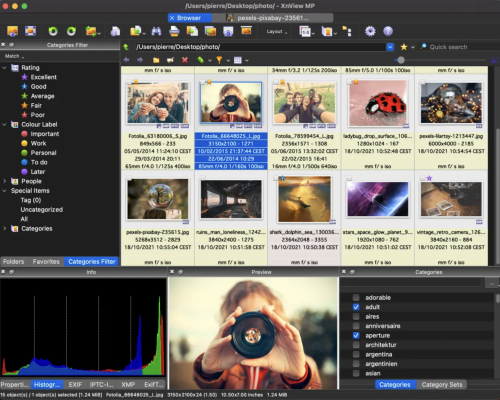
XnView MP/Classic
XnView MP/Classic is a free Image Viewer to easily open and edit your photo file. The Image Viewer supports all major image formats (JPEG, TIFF, PNG, GIF, WEBP, JPEG-XL, AVIF, HEIC, PSD, JPEG2000, OpenEXR, camera RAW, PDF, DNG, CR2). As Image Viewer you have features like color adjusting, image resizer, cropping, screen capture, metadata editing (IPTC, XMP) and much more. With its easy-to-use explorer-like interface, XnView MP allows you to quickly view your images and photos, but also to make image management. You have features like batch rename, batch converter, duplicate image finder, image compare, but you can also create contact sheets, slideshow.In addition to its viewing capabilities, XnViewMP includes tools for organizing and managing images efficiently. Users can create catalogs, apply tags, and even perform basic editing tasks. The program is free to use, making it an accessible option for anyone looking to enhance their image handling experience on Mac. Whether you need a simple viewer or a comprehensive image management solution, XnViewMP provides a robust set of features to meet your needs.
- 0 replies
Featured by eivindsimensen

Neo
Your data is never sold. What happens in Norton Neo stays in Norton Neo. You’re in control: choose what Norton Neo remembers - and what it forgets. Or just turn it off. Built-in VPN, anti-fingerprinting, and ad blocking are built-in. No extensions. No setup.Most tracking does not rely on cookies anymore. Websites build a hidden profile using dozens of invisible signals: your screen size, installed fonts, GPU behavior, audio settings, and more. Neo blocks and randomizes those signals by default, globally, across every site you visit. No setup. No toggle. Always on.Powered by Norton and built directly into the browser. One click encrypts all your browsing traffic. No separate app, no extra subscription required. A strict no-log policy means your browsing history, DNS queries, and IP address are never stored. Independently audited annually.Cleaner browsing, smarter blocking, and no extensions required. The ad blocker runs quietly in the background every session, active by default from the moment you open the browser.
- 0 replies
Featured by eivindsimensen
Keka for Mac
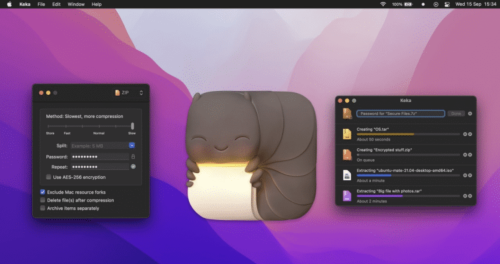
Keka for Mac is a versatile file archiver that offers users of all technical knowledge levels the ability to easily, quickly, and reliably compress and extract files in various supported formats.It comes as a standalone tool that can be used inside a simple drag-and-drop UI interface and as a background service accessible from a command-based Terminal app.This highly versatile approach makes it appealing to both novice and seasoned users, especially since it is completely free to use.The app supports a wide range of compression formats (including the most popular ones Zip and 7Z), even more extraction formats (ZIP, RAR, TAR, and others), and can even manage ISO format for CD/DVD disc image archives, enabling users to quickly access this archived content without the need for cumbersome CD/DVD virtual drive apps.However, users should be aware that this app supports much more extraction than compression formats, limiting its usefulness for users who want total control over their file management workflow.Key FeaturesCompress files in popular archive formats such as 7Z, ZIP, TAR, GZIP, and others.Extract files from 10+ popular compresses archive formats.Full support for encryption using AES-256 standard.A large array of advanced tools, including support for file splitting, compression strengths, separate item compression, and more.Simple drag-and-drop interface for ease of use.Full support for Terminal command access.Installation and SetupTo install it, users simply must download the latest version of the installer from the official website, or the secure FileHorse servers. The developers actively support only the modern version of the app that receives regular updates on mac OS 10.5 or newer.The legacy version of the app (for Mac OS X 10.4 and older) can be found on the official website.Once installed, Mac users can also make the Keka app as their default extraction app, but this can only be achieved by downloading and installing a separate helper app called “KekaDefaultApp” from the official website.Simply start the app and follow a few simple on-screen instructions to finish the procedure of elevating Keka to the position of primary compression file manager.
- 0 replies
Featured by eivindsimensen
AVG AntiVirus for Mac
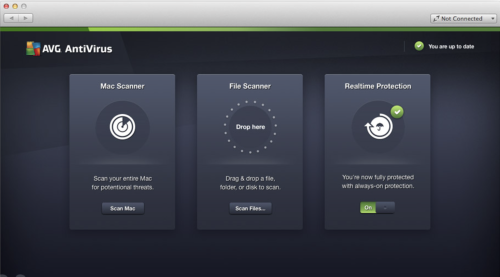
AVG AntiVirus Free for Mac is an Anti-Virus program which is absolutely free for non-commercial use for the life of the product. Created from the ground up to provide every Mac user brilliant protection during surfing, social networking and exchanging data with other people using portable USB storage devices.AVG is quality Anti-Virus proven by over 250 million of users, who have used this software suite and the accompanying cloud services to protect PCs, Macs, mobile phones and tablets against any kind of online threat.It even has integrated anti-theft tools that will enable you to locate your stolen hardware. Download, Install or Update AVG AntiVirus for macOS!AVG continues to deliver essential free antivirus protection with the launch of AVG AntiVirus Free. It goes beyond simply detecting and removing viruses on your Mac by blocking infected links as you browse, checking files before they're downloaded, and helping protect your personal data online and on your Mac with enhanced privacy features.AVG has improved core engine and its accuracy and included a new cloud-based detection method. And because security is just as important as usability.What`s New in latest version 2026Improved real-time threat detection with enhanced AI-based analysis.Updated malware definitions for stronger protection against new threats.Enhanced ransomware protection with better file shielding controls.Improved Web & Email Shield for safer browsing and attachments.Optimized performance with lower background resource usage.Refined Smart Scan with faster and more accurate results.Enhanced phishing detection and malicious link blocking.Improved compatibility with the latest Windows updates.User interface tweaks for clearer protection status overview.Bug fixes and overall stability improvements.Features and HighlightsExceptional anti-virus protectionAnti-virus protection that automatically updates to protect you from continually evolving threats. As hackers develop new techniques, AVG’s research labs are constantly processing web data to provide new defenses to keep you automatically protected.Gaming and surfing without interruptionsGet on with your surfing and gaming without interference. Scans operate when you are away from your Mac, and it also knows when you are gaming and ensures that the security operates in the background only, leaving you free to play.
- 0 replies