Anti-Virus and Security
10 files
-
Tabs
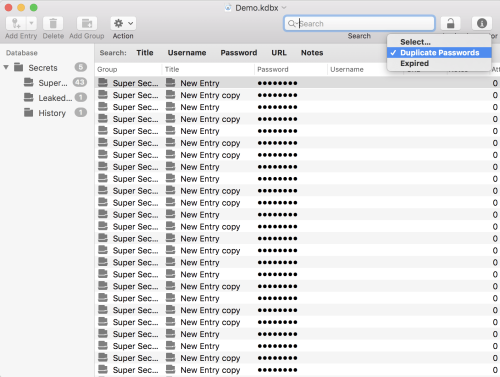
Open files in individual windows or use tabs to use a single window.
Autosave
Your files will get saved constantly. Lost something and cannot recover it from an entries history? Browse versions to find what you're looking for!
Undo/Redo
MacPass supports Undo/Redo for everything you do with your data. Something went wrong and you want to revert it, just undo your changes an you're good to go!
Drag & Drop
Move or copy entries and groups inside a database or between two files. Add file attachments by dropping them onto entries. You even can add entries by dragging URLs onto the database.
Quicklook
Enable previews to leverage the QuickLook system for previews of a variety of file types to take a look at your file attachments.
Autotype
Autotype enables MacPass to supply authentication credentials for any text based input. From webforms to authentication dialogs in any application. With Global Autotype you even can invoke Autotype from anywhere with a system wide shortcut. For more information please refer to the documentation. And much more
- 4 Downloads
-
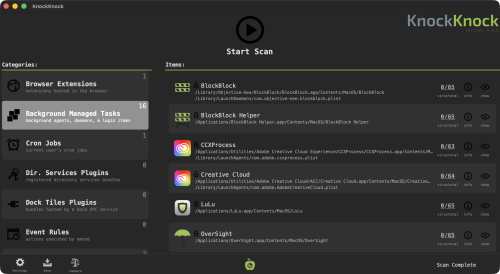
Who's there?", See what's persistently installed on your Mac! Malware often installs itself persistently, to ensure it is automatically (re)executed each time a computer is restarted. KnockKnock uncovers persistently installed software in order to generically reveal such malware.
Launching KnockKnock
To use KnockKnock, first download the zip archive containing the application. Depending on your browser, you may need to manually unzip the application by double-clicking on the zipped archive.
There is no need to install anything, and KnockKnock can be run from anywhere. (This also means there is nothing to uninstall, simple delete the application).
To run the application and begin a scan, simply double-click KnockKnock.app.
The first time you run KnockKnock, it may prompt you to grant it Full Disk Access (FDA), so it can scan your entire computer: Though the exact steps vary by macOS version, granting an app Full Disk Access is always done via System Settings. Simply search for Full Disk Access, scroll until you see KnockKnock and toggle it on. If it doesn’t appear, click the + button and add it manually by browsing to its location on disk.
Next, KnockKnock will show an initial configuration screen that lets you choose how it should run. All of these settings can be changed later in the app’s settings. Following this, you'll be able to provide a VirusTotal API key, if you want KnockKnock check for known malware: Want a free personal VT API key? See: "Please give me an API key".
- 3 Downloads
-
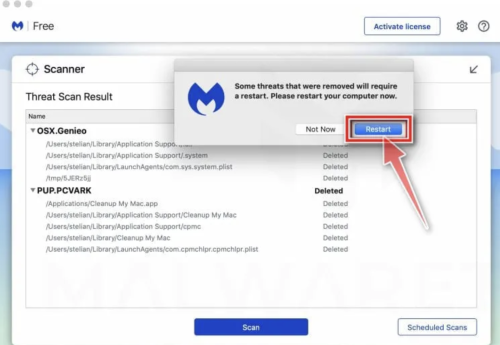
Is your Mac running slow? Annoying adware, like pop-ups, or malware could be the problem. Malwarebytes for Mac scans for and removes code that degrades system performance or attacks your system.
Making your Mac, once again, your Mac. What it does for you: Removes adware, such as Genieo, VSearch, and Vidx; Removes malware for Mac, including Trojans; Scans quickly; Simplifies program management through a clean, lean interface.
Malwarebytes Anti-Malware for macOS scans for and removes code that degrades performance or attacks your system! Proven Malwarebytes technology crushes the growing threat of Mac malware. So you are protected and your machine keeps running silky smooth.
What`s New
Latest macOS release adds a guided setup flow from trial to free version with customizable alert options.
Free users can now enable a monthly scheduled security scan with clear in-app guidance.
Malwarebytes for Mac gets smarter, deeper scan options with Quick, Threat, and Custom scan modes.
Mac updates also include significantly reduced CPU usage for lighter system impact and improved performance.
Expanded threat protection covers malware, ransomware, spyware, and malicious websites across devices.
Mobile Scam Guard helps identify and avoid phishing and scam content in messages and links.
Browser Guard extensions block ads, trackers, and scam sites for safer web browsing.
Improved phishing and scam research with Malwarebytes joining the Global Anti-Scam Alliance to better fight online fraud.
Real-time protection and advanced threat blocking available in Premium plans for ongoing security.
VPN integration support encourages users to add privacy protection alongside malware defenses.
What makes Malwarebytes for Mac different:
Protects you from Mac threats
Detects and removes viruses, ransomware, and other malware in real time with advanced anti-malware technology. Catches dangerous threats automatically, so you’re protected without having to even think about it.
Removes adware and unwanted programs
Crushes adware and potentially unwanted programs that slow your Mac. Your Mac experience will remain clean and pristine.
Scans Mac-fast
Scans the average Mac in under 15 seconds. Run the malware scanner in the background while you boot up your favorite game. It's done by the time you're ready to play.
Light and lean
Only the size of three digital music files. That means more disk space for your movies, music, and apps.
What`s New
Latest macOS release adds a guided setup flow from trial to free version with customizable alert options.
Free users can now enable a monthly scheduled security scan with clear in-app guidance.
Malwarebytes for Mac gets smarter, deeper scan options with Quick, Threat, and Custom scan modes.
Mac updates also include significantly reduced CPU usage for lighter system impact and improved performance.
Expanded threat protection covers malware, ransomware, spyware, and malicious websites across devices.
Mobile Scam Guard helps identify and avoid phishing and scam content in messages and links.
Browser Guard extensions block ads, trackers, and scam sites for safer web browsing.
Improved phishing and scam research with Malwarebytes joining the Global Anti-Scam Alliance to better fight online fraud.
Real-time protection and advanced threat blocking available in Premium plans for ongoing security.
VPN integration support encourages users to add privacy protection alongside malware defenses.
- 24 Downloads
-
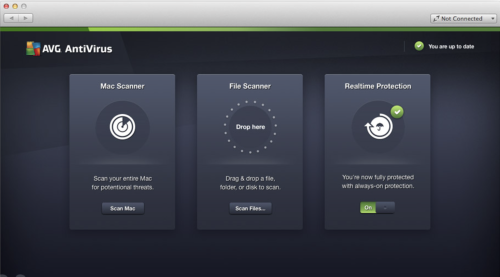
AVG AntiVirus Free for Mac is an Anti-Virus program which is absolutely free for non-commercial use for the life of the product. Created from the ground up to provide every Mac user brilliant protection during surfing, social networking and exchanging data with other people using portable USB storage devices.
AVG is quality Anti-Virus proven by over 250 million of users, who have used this software suite and the accompanying cloud services to protect PCs, Macs, mobile phones and tablets against any kind of online threat.
It even has integrated anti-theft tools that will enable you to locate your stolen hardware. Download, Install or Update AVG AntiVirus for macOS!
AVG continues to deliver essential free antivirus protection with the launch of AVG AntiVirus Free. It goes beyond simply detecting and removing viruses on your Mac by blocking infected links as you browse, checking files before they're downloaded, and helping protect your personal data online and on your Mac with enhanced privacy features.
AVG has improved core engine and its accuracy and included a new cloud-based detection method. And because security is just as important as usability.
What`s New in latest version 2026
Improved real-time threat detection with enhanced AI-based analysis.
Updated malware definitions for stronger protection against new threats.
Enhanced ransomware protection with better file shielding controls.
Improved Web & Email Shield for safer browsing and attachments.
Optimized performance with lower background resource usage.
Refined Smart Scan with faster and more accurate results.
Enhanced phishing detection and malicious link blocking.
Improved compatibility with the latest Windows updates.
User interface tweaks for clearer protection status overview.
Bug fixes and overall stability improvements.
Features and Highlights
Exceptional anti-virus protection
Anti-virus protection that automatically updates to protect you from continually evolving threats. As hackers develop new techniques, AVG’s research labs are constantly processing web data to provide new defenses to keep you automatically protected.
Gaming and surfing without interruptions
Get on with your surfing and gaming without interference. Scans operate when you are away from your Mac, and it also knows when you are gaming and ensures that the security operates in the background only, leaving you free to play.
- 25 Downloads
-
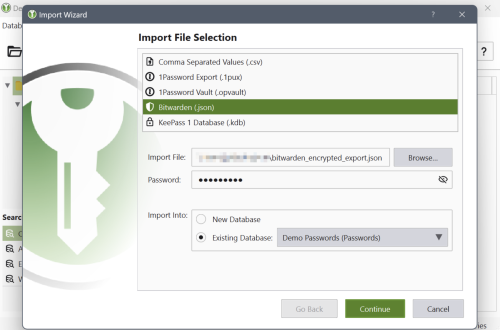
KeePassXC for Mac can store your passwords safely and auto-type them into your everyday websites and applications. You shouldn't waste your time trying to remember and type your passwords.
The thing computers can do best is storing information! Download KeePass Cross-Platform Community Edition now!
Encrypted
The complete database is always encrypted with the industry-standard AES (alias Rijndael) encryption algorithm using a 256-bit key. KeePassXC for macOS uses a database format that is compatible with KeePass Password Safe. Your wallet works offline and requires no Internet connection.
Cross-Platform
KeePassXC for Desktop is a community fork of KeePassX, the cross-platform port of KeePass for macOS. Every feature works cross-platform and was thoroughly tested on multiple systems to provide users with the same look and feel on every supported operating system. This includes the beloved Auto-Type feature.
Features and Highlights
Secure storage of passwords and other private data with AES, Twofish, or ChaCha20 encryption
Cross-platform runs on Linux, Windows, and macOS without modifications
File format compatibility with KeePass2, KeePassX, MacPass, KeeWeb, and many others (KDBX 3.1 and 4.0)
SSH Agent integration
Auto-Type on all supported platforms for automatically filling in login forms
Key file and YubiKey challenge-response support for additional security
TOTP generation (including Steam Guard)
CSV import from other password managers (e.g., LastPass)
Command-line interface
Stand-alone password and passphrase generator
Password strength meter
Custom icons for database entries and download of website favicons
Database merge functionality
Automatic reload when the database was changed externally
Browser integration with KeePassXC-Browser for Google Chrome, Chromium, Vivaldi, and Mozilla Firefox.
(Legacy) KeePassHTTP support for use with KeePassHTTP-Connector available for Mozilla Firefox and Google Chrome, and passafari for Safari.
- 9 Downloads
-
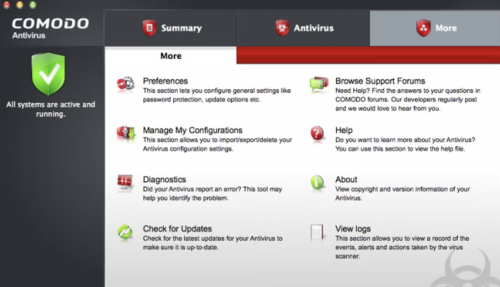
Comodo is a reliable firm that has been providing security software and firewalls for some time now for Windows based machines, and the offering for the Mac arena is a pretty good solution as well.
Comodo Antivirus for Mac provides quality virus protection for your Mac computer. It features an on-demand scanner, 'always on' real-time protection and a continuously updated database of known viruses and threats.
Key Features include:
Automatic updates for the most up-to-date virus protection.
Drag and drop any object onto the dock icon for instant virus analysis.
Easy to use interface lets you install and forget: no annoying pop-ups or false alarms.
Instant One-Click scanning.
Simple slider to change your security level.
User-friendly interface.
Built in scheduler.
On-access scanning
The user interface of Comodo Antivirus for Mac is crisp and fairly pleasing on the eyes. It allows you to alter the settings as per your needs and requirements. All the usual features such as automatic updates, scan on demand, quarantine etc, are all available, just the same as they are on the Windows counterpart.
Overall, Comodo Antivirus for Mac is a good, proactive solution for Mac computers. It provides a membrane of protection against viruses, worms and Trojan horses for Apple’s flagship operating system.
- 12 Downloads
-
It has long been established that you definitely do need an antivirus on macOS. Malware that targets Apple's systems has grown increasingly common, as evidenced by the recent spread of a new virus that targets Apple's M1 devices exclusively.
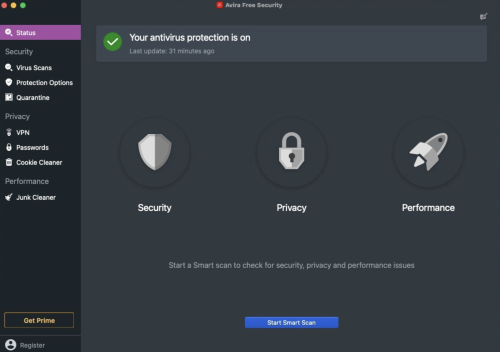
So if you're on the market for an antivirus, Avira is surely one of the first names to pop in your head. The company has a long history of providing reliable antivirus solutions, always ranking among the top contenders in independent comparative tests. On top of that, Avira Free Security comes with some additional features, such as a VPN, junk cleaner, and password manager.
Industry-leading antivirus protection
Unlike their Windows counterparts, Mac users often have a hard time figuring out which antivirus offers the best protection. Expert comparative tests exist, but many macOS security solutions aren't included in these tests, largely due to a lack of demand.
However, Avira has been included in comparative tests such as AV-TEST for years, and it has gotten a maximum protection score almost every time. If you're after the best security available, you can't really go wrong with Avira Free Security. While it lacks the web and mail protection features of Avira Antivirus Pro, both products use the same antivirus module.
The app offers real-time protection, which can be disabled at any time from the system tray. You can also run a quick or full scan, but there is no option to scan a specific file or location on your Mac. Identified malware or suspicious items can be managed from the quarantine.
Password manager and free (albeit limited) VPN
Unsurprisingly, given that this is a full security suite, a password manager is also available. However, it must be noted that you can't access it from the main interface directly. Instead, it is opened in your default browser, and while extensions are available for Chrome and Firefox, that is not the case for Safari.
Avira's Phantom VPN is included in this free security suite, but it must be installed separately, after setting up the main product. However, while it offers a decent number of locations and servers, the free version is limited to just 500 MB of traffic per month, making an upgrade to Phantom VPN Pro pretty much a necessity.
Clean up junk files and reclaim disk space
In addition to protecting you against malware, Avira Free Security can prove helpful if you're trying to free up some disk space on your Mac.
The app can remove cache files and reports and logs, as well as remove items from your Downloads folder and Trash. While the latter two can be done by any user easily, cache files and logs aren't easily accessible, so this feature can indeed be useful.
If you're looking for a reliable free antivirus, this is it
When it comes to protection against malware, Avira Free Security shouldn't let you down. It has a proven track record, and you can take advantage of the scanning and real-time protection modules for free indefinitely, making it a great choice for users who don't want to pay for an antivirus.
The rest of the features included in the packages aren't as impressive. The free VPN is hardly usable without a subscription, and the password manager is only accessible via a browser, with no extension available for Safari users. The junk cleaner can at least help you get rid of some hard-to-find files.
- 14 Downloads
-
Sophos Home is a robust antivirus solution designed for home computers, offering comprehensive protection against online threats such as viruses, phishing scams, malware, exploits, and ransomware. Utilizing advanced artificial intelligence, it proactively detects and blocks malicious software while safeguarding users from risky websites. With a focus on security and privacy, Sophos Home stands out for its cutting-edge features and constant threat monitoring.
Unique to Sophos Home is its next-generation artificial intelligence powered by deep learning, enabling preemptive virus detection and blocking. Trusted by global institutions, this AI continuously analyzes incoming files to ensure user safety. Sophos Home's vigilant surveillance, backed by SophosLabs, actively combats modern threats like ransomware, spyware, Trojans, and more, offering round-the-clock protection for home computers.
- 16 Downloads
-
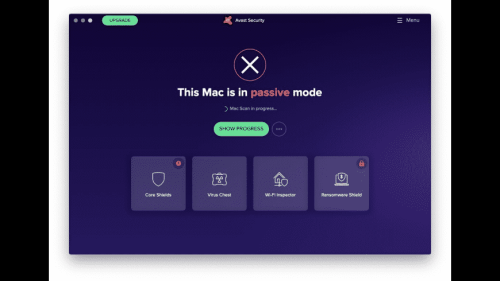
Avast Security for Mac offers three shields, on-demand scanning and WebRep clients which are automatically (optionally) installed to Safari, Chrome and Firefox browsers.
Web Shield and Mail Shield combine to check the vast majority of incoming data from the Internet, while File Shield scans all programs stored and executed from your hard drive. Everything is packed in a brand new GUI.
Malware isn’t the only threat to your Mac. Malicious websites and vulnerable Wi-Fi networks can also jeopardize your safety and privacy. Avast Security for Mac provides more protection against all 3 threats, and our new premium version also helps expose Wi-Fi intruders and helps stop ransomware.
What`s New in latest version 2026
Improved real-time threat detection with enhanced behavioral analysis.
Updated virus definitions for stronger protection against latest malware.
Enhanced ransomware shield with better file protection controls.
Improved Web Shield for safer browsing and phishing prevention.
Optimized performance with reduced system resource usage.
Refined user interface for easier navigation and status overview.
Enhanced email protection against malicious attachments.
Improved Smart Scan speed with more accurate system checks.
Better compatibility with macOS security features.
Bug fixes and overall stability improvements.
Macs need protection, too
Mac OS X is considered one of the most secure operating systems available. But today’s threats aren’t after your computer – they’re after your identity and your money.
New threats target you personally
These days hackers “phish,” “spearphish” and “whale” to target you specifically. Combine these with other threats like router hijacking, and your identity is at great risk of being stolen.
Will it work with my Mac?
If you’re on a Mac running OSX, it will work. You need 128 MB of RAM and 750MB of disk space. Beyond that, you can be running just about any stable version of OSX (even Yosemite), and the app keep you protected.
There’s security in numbers
More people around the world trust Avast for their security than any other company. That means better security for all of us. The reason is simple: "We see and react to more data from more users, so we can make your protection better.
- 18 Downloads
-
1.1.1.1 with WARP is a free security program that lets you boost your loading speed and keep your privacy more secure. Developed by Cloudflare, this application is a DNS resolver that shields your device from security threats like malware, phishing, and the like.
1.1.1.1 with WARP replaces your connection with a more modern and optimized protocol — making things much more private compared to traditional wired protocols. Available on both PC and mobile, this anti-spy software makes sure that your data is always safe each time you go online.
How do I use Warp 1.1 1.1 on PC?
1.1.1.1 is a free Domain Name System (DNS) service that functions as a recursive name server. This allows your DNS queries to bypass less secure connections so that your data won’t be spied on or sold to companies who need your data profile for marketing purposes. This time, Cloudflare offers 1.1.1.1 with the WARP feature, which is its built-in VPN service.
With this, 1.1.1.1 with WARP has two modes you can freely switch between: 1.1.1.1 and WARP. The difference between them is that the former only focuses on DNS queries while the latter includes a VPN shield—making it the default and more preferred mode. To use this software, just simply launch it and toggle on the big button on the menu.
To switch the modes, just click on the gear icon. Under Preferences, you can see the General settings, Connection, Account, Feedback, DNS Logs, and Advanced settings. There’s even a function called 1.1.1.1 for Families that blocks adult content. Unlike the mobile version, however, you can’t purchase or access the paid monthly subscription, WARP+, on PC. Plus, sometimes your loading speed will slow down instead of speeding up.
Enhancing your experience with Warp+
For users wanting more from their internet experience, 1.1.1.1 with WARP offers a premium path packed with enhanced capabilities. Its subscription model, WARP+, introduces unlimited WARP+ data and customizable route selections for optimizing online traffic management. This setup is ideal for users needing reliable speed during peak usage times. By choosing this premium package, you not only improve your internet connection stability but also elevate your overall digital experience.
Understanding the hesitation some may feel before committing, a free trial is offered to try out these advanced features before upgrading. It's a risk-free way to explore the benefits without an upfront investment, allowing users to evaluate if the added features meet their needs effectively. However, it’s important to note that once the subscription begins, any remaining free trial time or WARP+ data credits will no longer be available to ensure resource allocation is streamlined.
Shouldn’t be slow
Overall, 1.1.1.1 with WARP is an easy-to-use and lightweight program. You don’t need to know much about setting up this kind of tool due to how user-friendly the interface is. It’s designed to boost your browsing speed while securing your privacy. However, unlike the mobile version, you can’t avail of its premium service. It also has some issues with loading speed.
- 17 Downloads

Blog Entries
-
- 0 Comments
- 152 Views
-
- 0 Comments
- 118 Views
-
- 0 Comments
- 140 Views
-
- 0 Comments
- 124 Views
-
- 0 Comments
- 128 Views




Links
-
- 0 Comments
-
- 0 Comments
- 1 Total Hits
-
- 0 Comments