
eivindsimensen
Administrators
-
Joined
-
Last visited
-
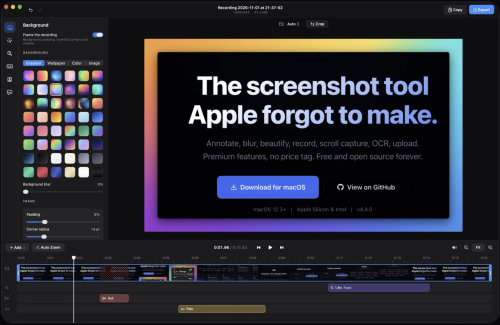 Annotate, blur, beautify, record, scroll capture, OCR, upload. Premium features, no price tag. Free and open source forever. Global hotkey freezes your screen. Select any region, snap to windows, or capture full screen. Multi-monitor support with cross-screen stitching. Click any annotation to select it, then edit stroke, style, color, and fill in real time. Full undo/redo. Rotate, resize, and reposition without switching tools. Select a region and scroll. macshot stitches it into one tall image with Apple Vision. Live preview updates as you scroll. Record any area as MP4 (up to 120fps) or GIF. System audio, microphone, mouse highlights. Built-in trim editor. Pixelate, blur, solid fill, or erase. Auto-redact PII (emails, phones, API keys), detect faces and people. Erase mode intelligently matches surrounding colors. 30 gradient backgrounds including mesh gradients. macOS window frame with traffic lights, shadow, adjustable padding and corner radius. Extract text with Apple Vision. Auto-detects all languages. Copy to clipboard, translate to 30+ languages, or search with Google AI. One-click upload to Google Drive, imgbb, or any S3-compatible service (Cloudflare R2, AWS, MinIO). Link copied instantly. Pure Swift + AppKit. No Electron, no web views, no bloat. Lives quietly in your menu bar.
-
 Zen Browser is a free, Firefox-based web browser designed for macOS, emphasizing speed, security, and user privacy. It features a customizable interface with options for light or dark themes, intuitive tab organization, and a workspace management system that enhances productivity. Users can easily manage multiple tabs and workspaces, making it ideal for multitasking. The browser also includes a unique split-screen feature for viewing multiple tabs simultaneously, as well as a compact mode for smaller screens. One standout aspect of Zen Browser is its commitment to user privacy. It does not track online activity or collect user data, ensuring a secure browsing experience. Additionally, it enforces HTTPS connections for non-secure sites, further protecting users. The Zen Theme Store allows for extensive customization, with themes that enhance both aesthetics and functionality. Overall, Zen Browser offers a robust alternative to traditional browsers, prioritizing user control and security.
-
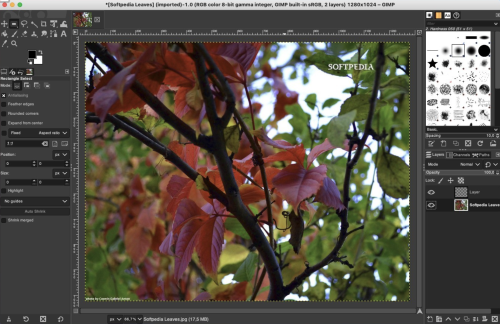 Gimp is a fully-featured and versatile graphics manipulation packages that enables you to adjust and retouch photos and images with ease. Comprehensive image editing application for novice and experience usersThe first thing you’ll notice about Gimp, is that it comes with a customizable interface that can be changed and adjusted according to the task you need to perform. Hence, you can personalize the view and change the behavior accordingly. Gimp allows you to change anything from widget theme, widget spacings and icon sizes to custom tool sets in the toolbox. The main window is composed of multiple modules called docks that you can stack up into tabs or keep them in their own window. You can even hide them and summon them with a key press. Numerous out-of-the-box editing tools and photo enhancement functionsWhat is more, Gimp features a full-screen mode that enables you to preview your work and edit using your entire screen and with the help of the provided tools and functions. Consequently, you can fix and repair numerous digital photo imperfections, color aberrations and distortions. Hence, you can fix perspective distortion generated by lens tilt by using the corrective mode from the transform tools. For example, the lens’ barrel distortion and vignetting are annoying issues that can be easily adjusted thanks to the powerful filter. Take advantage of the support for the pressure and tilt sensitive tablets and let your creativity freeAt the same time, the built-in channel mixer offers you the power and flexibility you need to enhance your Black and White photos and focus on specific areas. Gimp is also the perfect choice for professional photographers. The advanced inbuilt photo retouching tools can help you remove unneeded details, touch up minor details and heal damaged portions of a picture. On top of that, Gimp is compatible with most common image formats such as JPEG, JFIF, TIFF, PNG and more. All of the above, combined with the built-in support for a wide variety of input devices, make the Gimp app a must have for amateur and professional photographers.
-
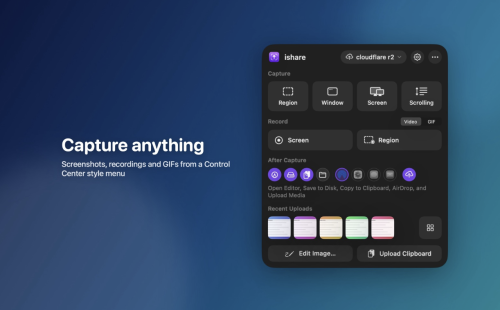 Promising, extensible screen capture utility with a focus on easily uploading and sharing images or videos, using Imgur or custom uploadersmacOS has a very capable and easy-to-use screen capture utility built right in, but third-party utilities can bring additional features, such as extra personalization, or instant media uploads. ishare is an open-source app that seems to be focused on making it easier to capture, upload, and share images or videos. The project is still in its infancy, with some features not fully implemented, but it already offers instant Imgur uploads of captured images. Instantly capture and upload screenshotsThe app only runs in the menu bar, and you can open the menu to check the default hotkeys and enable post media tasks. The settings window includes additional preferences, allowing you to change keybinds, the output location, and more. Once you’ve captured a screenshot, the app can automatically upload it to Imgur and copy the URL to the clipboard. The process is seamless and great for quickly sharing something on your screen without any fuss. Good feature set, with possible improvementsLooking past the upload functionality, we see a few missing features. While you can capture a region, window, or screen, there is no option to preserve or fine-tune the capture area, something you can do with the built-in utility. The screen recording functionality allows you to capture any window or application, but you cannot record a specific area of the screen. Use custom uploaders and pluginsOne of the main advantages of ishare will be the ability to use custom uploaders and plugins for media processing. Uploaders can already be set up, with plugin specifications to be detailed in a later release. Overall, ishare shows promise, but there is still work to be done. For now, if you just need a simple way to capture, upload, and share screenshots or video, it should work just fine.
-
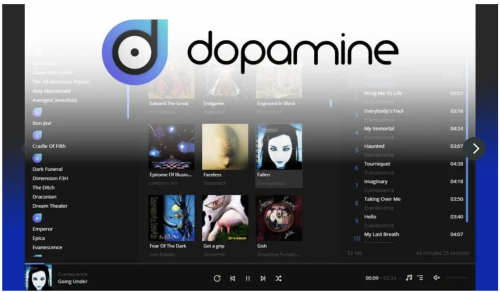 Free Download Dopamine's latest standalone offline installer for macOS. It is an audio player that tries to make organizing and listening to music as straightforward and pretty as possible. Overview of Dopamine for macOSIt is a powerful music player designed to enhance your audio experience on macOS. This intuitive software boasts a sleek interface, advanced features, and seamless performance, making it an essential tool for music enthusiasts and professionals. Features of Dopamine for macOSIntuitive Interface Dopamine features a clean, modern interface that is easy to navigate and use. Its minimalist design allows you to focus on enjoying your music without any distractions. High-Quality Playback Experience music like it was meant to be heard with Dopamine's high-quality playback. The software supports a wide range of audio formats, ensuring you can enjoy your favorite tracks in their best quality. Advanced Audio Management Organize your music library effortlessly with Dopamine's advanced management tools. Tag editing, album art retrieval, and intelligent playlists are just a few of the features that help you keep your collection in perfect order. Customizable Skins Personalize your music player with customizable skins. Dopamine allows you to change the software's look and feel to match your style and preferences. Gapless Playback Enjoy uninterrupted music with Dopamine's gapless playback feature. This ensures smooth transitions between tracks, providing a seamless listening experience.
-
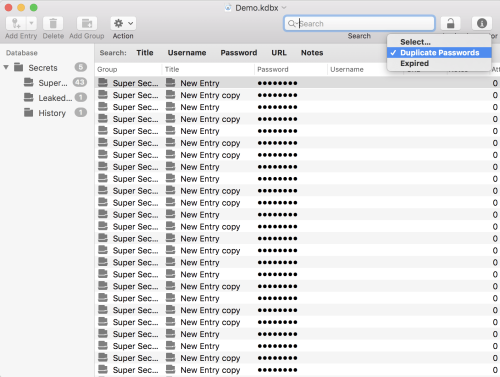 TabsOpen files in individual windows or use tabs to use a single window. AutosaveYour files will get saved constantly. Lost something and cannot recover it from an entries history? Browse versions to find what you're looking for! Undo/RedoMacPass supports Undo/Redo for everything you do with your data. Something went wrong and you want to revert it, just undo your changes an you're good to go! Drag & DropMove or copy entries and groups inside a database or between two files. Add file attachments by dropping them onto entries. You even can add entries by dragging URLs onto the database. QuicklookEnable previews to leverage the QuickLook system for previews of a variety of file types to take a look at your file attachments. AutotypeAutotype enables MacPass to supply authentication credentials for any text based input. From webforms to authentication dialogs in any application. With Global Autotype you even can invoke Autotype from anywhere with a system wide shortcut. For more information please refer to the documentation. And much more
-
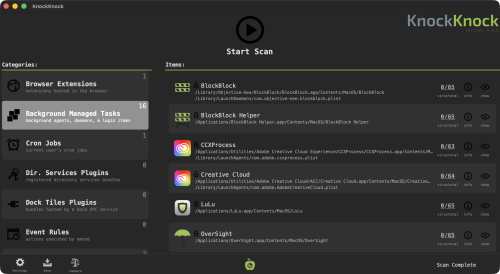 Who's there?", See what's persistently installed on your Mac! Malware often installs itself persistently, to ensure it is automatically (re)executed each time a computer is restarted. KnockKnock uncovers persistently installed software in order to generically reveal such malware. Launching KnockKnock To use KnockKnock, first download the zip archive containing the application. Depending on your browser, you may need to manually unzip the application by double-clicking on the zipped archive. There is no need to install anything, and KnockKnock can be run from anywhere. (This also means there is nothing to uninstall, simple delete the application). To run the application and begin a scan, simply double-click KnockKnock.app. The first time you run KnockKnock, it may prompt you to grant it Full Disk Access (FDA), so it can scan your entire computer: Though the exact steps vary by macOS version, granting an app Full Disk Access is always done via System Settings. Simply search for Full Disk Access, scroll until you see KnockKnock and toggle it on. If it doesn’t appear, click the + button and add it manually by browsing to its location on disk. Next, KnockKnock will show an initial configuration screen that lets you choose how it should run. All of these settings can be changed later in the app’s settings. Following this, you'll be able to provide a VirusTotal API key, if you want KnockKnock check for known malware: Want a free personal VT API key? See: "Please give me an API key".
-
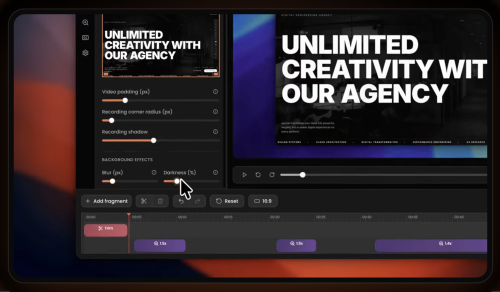 Give your demos the spotlight they deserveCapptivo is a Screen Studio and Cursorful alternative. Create stunning screen recordings in seconds, not hours. With smart follow-cursor zoom and automatic zoom fragments, your demos practically make themselves. Use a pen, highlighter, and simple shapes to explain a step, walk through a flow, or show what to look at. What you draw is saved in the recording, on top of the screen. Before you open Capptivo on Mac macOS builds are unsigned. If Gatekeeper blocks the app or you see “Application is damaged”, right-click → Open, or run this command in Terminal: xattr -rd com.apple.quarantine /Applications/Capptivo.app
-
eivindsimensen changed their profile photo
-
-
-
-
-
-
-