




eivindsimensen
Administrators
-
Joined
-
Last visited
Everything posted by eivindsimensen
-
Signing up for a free trial, downloading a PDF, or joining a forum often requires handing over your email address. Inevitably, that leads to newsletters, marketing spam, and potential data leaks. Disposable email services—commonly known as temp mail or burner emails—solve this problem by giving you an instant, throwaway inbox. Here is a curated guide to 20 reliable temp mail providers you can use today. Top Disposable Email ServicesService Best Feature Direct Link Temp-Mail Auto-refreshes inboxes instantly with mobile apps available. temp-mail.org 10 Minute Mail Classic timer-based inbox that automatically self-destructs after 10 minutes. 10minutemail.com Guerrilla Mail Lets you pick your username, view sender IPs, and compose outgoing emails. guerrillamail.com Maildrop Clean, fast, and open-source spam shield that requires no registration. maildrop.cc Burner Mail Browser extensions generate unique forwarding addresses on the fly. burnermail.io Mohmal Minimalist 45-minute inbox with simple domain switching. mohmal.com TrashMail Forwards incoming emails to your real inbox for a limited number of times. trashmail.com EmailOnDeck Highly reliable for bypassing automated disposable-email detectors. emailondeck.com Dispostable Choose any alias at @dispostable.com without needing to generate it first. dispostable.com Nada Semi-permanent disposable addresses that last until the domain expires. getnada.com Internxt Temp Mail Zero-knowledge privacy platform with a built-in clean temporary mail tool. internxt.com/temporary-email Crazymailing Quick 10-minute inbox with one-click time extensions. crazymailing.com Tempail Generates instant addresses equipped with QR codes for mobile use. tempail.com Generator.email Lets you pick from thousands of custom domains to avoid blocks. generator.email Mailinator Public inboxes ideal for QA testing and developer workflow automation. mailinator.com Proton Pass Aliases Encrypted forwarding aliases managed via an ecosystem password manager. proton.me/pass SimpleLogin Advanced open-source email aliasing service owned by Proton. simplelogin.io AnonAddy (addy.io) Open-source forwarding tool supporting custom domains and PGP encryption. addy.io Boomerang Inbox Pause Built for slowing down newsletters and screening unverified signups. boomeranggmail.com DuckDuckGo Email Protection Free @duck.com addresses that strip out ad trackers before delivery. duckduckgo.com/email How to Choose the Right ProviderNot all temporary email tools serve the same purpose: Instant Burners (Temp-Mail, 10 Minute Mail, Mohmal): Best for one-off verification codes, quick downloads, and one-time web forms. Once you close the tab, the inbox is gone. Forwarding Aliases (SimpleLogin, addy.io, DuckDuckGo): Best when you actually need to receive updates or password resets over time without revealing your real address. They strip trackers and forward the emails to your main provider until you manually switch them off. Developer & QA Inboxes (Mailinator, Maildrop): Best for software testing, automated staging environments, and integration checks. Best Practices & PrecautionsNever use temp mail for critical accounts: Avoid using disposable inboxes for banking, primary social media, government services, or services tied to credit cards. If you lose access to the inbox, account recovery will be impossible. Be aware of public inboxes: Platforms like Maildrop and Mailinator do not password-protect inboxes; anyone who guesses the username can read the messages inside. Check for site blocks: Some platforms maintain blocklists of popular disposable domains. If an address gets rejected during signup, choose a tool that rotates domains frequently (such as EmailOnDeck or Generator.email). Made with AI
-
Completely Free & Generous Free TiersAvast Free Antivirus Avast delivers one of the most comprehensive free packages available. It includes real-time file scanning, web and email shields, Wi-Fi vulnerability inspectors, and behavior analysis to intercept zero-day threats before they execute. Official Website: https://www.avast.com AVG AntiVirus Free Built on the same core scanning engine as Avast, AVG provides a lightweight alternative with a straightforward interface. It reliably halts ransomware, blocks unsafe links and downloads, and runs quiet background scans without heavy system impact. Official Website: https://www.avg.com Avira Free Security Avira is renowned for its low false-positive rate and high malware detection accuracy. The free suite bundles an antivirus scanner, basic software updater, system tune-up utilities, and a 500 MB monthly VPN limit. Official Website: https://www.avira.com Bitdefender Antivirus Free Bitdefender offers an unobtrusive, set-it-and-forget-it approach. It brings the full strength of Bitdefender's top-tier threat detection cloud to clean up threats instantly, avoiding ads or constant notification spam. Official Website: https://www.bitdefender.com Microsoft Defender Integrated natively into Windows, Microsoft Defender requires no additional setup or subscription. It scores consistently well against malware, includes built-in firewall integration, and provides seamless system performance without third-party pop-ups. Official Website: https://www.microsoft.com/windows Malwarebytes Free Malwarebytes specializes in remediation and aggressive cleanup. While the free edition lacks automated real-time shields after its initial trial, it remains an industry standard for on-demand scans and scrubbing hard-to-remove adware and rootkits. Official Website: https://www.malwarebytes.com Panda Free Antivirus Panda operates primarily in the cloud, keeping local resource usage to a minimum. The free edition features automated USB drive vaccination, a rescue kit for unbootable systems, and clean game/multimedia modes. Official Website: https://www.pandasecurity.com Sophos Home Free Sophos adapts enterprise-level threat management for household use. The free tier lets you manage protection remotely through a web dashboard, protecting against phishing sites, trojans, and web-based exploits. Official Website: https://home.sophos.com ClamAV An open-source staple primarily designed for mail servers and power users, ClamAV provides free command-line virus scanning across Linux, Windows, and macOS. It features a community-updated signature database and zero licensing fees. Official Website: https://www.clamav.net Adaware Antivirus Free Adaware combines traditional anti-malware scanning with specialized spyware removal. Its free edition includes on-demand threat scans, download shields, and a dedicated gaming mode to suppress notifications. Official Website: https://www.adaware.com Premium Antivirus Suites with Free TrialsESET HOME Security ESET is widely praised for its minimal system footprint and advanced heuristics. While not permanently free, its 30-day trial gives full access to multi-layered ransomware defense, banking protection, and UEFI scanner tech. Official Website: https://www.eset.com Norton 360 A heavyweight in the cybersecurity sector, Norton combines full-spectrum malware defense with identity theft safeguards, encrypted cloud backup, and parental controls via trial and subscription plans. Official Website: https://www.norton.com McAfee Total Protection McAfee offers comprehensive security across unlimited household devices on higher tiers. Features include real-time web defense, automated cookie/tracker scrubbing, firewall configuration, and file shredders. Official Website: https://www.mcafee.com Trend Micro Antivirus+ Security Trend Micro emphasizes web-layer defense, preventing malicious scripts and fraudulent phishing domains from loading. It is especially strong at stopping email phishing attempts and unauthorized ransomware file modifications. Official Website: https://www.trendmicro.com Webroot SecureAnywhere Webroot takes a hyper-fast, cloud-first approach with an installer under 5 MB. Rather than downloading heavy definition libraries locally, it analyzes file behavior against a live cloud directory in seconds. Official Website: https://www.webroot.com
-
1. VimeoWebsite: https://vimeo.com Vimeo is known for high-quality videos and a professional community of filmmakers, artists, and businesses. It offers a cleaner viewing experience with fewer advertisements compared to YouTube. Advantages:High video quality No intrusive ads Popular among creative professionals 2. DailymotionWebsite: https://www.dailymotion.com Dailymotion is one of the oldest video-sharing platforms and provides a similar experience to YouTube, with millions of videos across various categories. Advantages:Easy-to-use interface Large content library Available worldwide 3. PeerTubeWebsite: https://joinpeertube.org PeerTube is a decentralized, open-source video platform that allows users to host their own video servers while remaining connected to the broader network. Advantages:Open source Decentralized infrastructure Strong privacy focus 4. OdyseeWebsite: https://odysee.com Odysee is a blockchain-based video platform that gives creators more control over their content and monetization. Advantages:Creator-friendly monetization Fewer restrictions Growing community 5. TwitchWebsite: https://www.twitch.tv Although primarily known for live streaming, Twitch also hosts recorded videos and is especially popular among gamers and content creators. Advantages:Excellent live streaming features Strong community engagement Built-in monetization tools 6. RumbleWebsite: https://rumble.com Rumble has gained popularity as an alternative video platform focused on creator monetization and content ownership. Advantages:Competitive revenue sharing Easy content uploads Rapidly growing audience 7. BitChuteWebsite: https://www.bitchute.com BitChute is a peer-to-peer video hosting service that emphasizes freedom of expression and decentralized content distribution. Advantages:Peer-to-peer technology Independent platform Less centralized moderation 8. DTubeWebsite: https://d.tube DTube is a decentralized video-sharing platform built on blockchain technology and designed to reward creators and viewers. Advantages:Decentralized network Cryptocurrency rewards No centralized ownership 9. Internet Archive VideoWebsite: https://archive.org/details/movies The Internet Archive hosts millions of free videos, educational resources, documentaries, and public domain content. Advantages:Free access Educational content Large archive of historical videos 10. WistiaWebsite: https://wistia.com Wistia is a business-focused video hosting platform designed for marketing, training, and professional video distribution. Advantages:Advanced analytics Marketing tools Professional hosting features ConclusionWhile YouTube remains the world's largest video-sharing platform, alternatives such as Vimeo, Dailymotion, PeerTube, and Odysee offer unique advantages ranging from better privacy and creator control to higher-quality video hosting. The best choice depends on whether your priority is audience reach, monetization, privacy, or professional presentation.
-
 All the tools you need for professional compositingAdobe Photoshop costs too much and tools like GIMP don’t feel familiar enough for me to stay in flow. That’s why I built Compositor. The goal was to create a full-featured image editor that is completely free and open source. I used to use Photoshop for compositing and post-processing, so Compositor is built around that workflow - with the tools needed to create a pixel-perfect final image. Because it’s open source, you can download the Xcode project and add, remove, or modify any feature to fit your needs. LayersLayers and folders, with opacity and Photoshop's full set of blend modes in its order — a folder's opacity dims everything inside it Layer masks: paint, fill, invert, blur and feather them anywhere on the canvas, past the layer's own pixels; link or unlink them to transform a mask on its own Clipping masks and folder masks Adjustment layers: Hue/Saturation, Levels, Curves, Exposure, Gradient Map, Grain, Black & White, Color Balance, Invert, Gaussian Blur, Motion Blur and Noise Layer effects: Stroke, Drop Shadow, Color Overlay, Inner Shadow, Outer Glow and Inner Glow, rendered on the GPU and editable at any time Merge Down, Merge Layers and Merge Group (⌘E) Duplicate, rename inline, reorder and nest by drag and drop; Option-drag to duplicate; a right-click menu in the Layers panel Copy and paste whole layers and folders (⌘C/⌘V with no selection), within a project or between projects, or drag them between projects TransformNon-destructive move, scale, rotate and flip — images keep their full resolution however small you make them Free distort (⌘-drag a handle), with Shift to lock to an axis Transform several layers, or a whole folder, together Snapping to canvas and layer edges and centers, with guides Exact values for position, size, scale and angle, stepped with the arrow keys Flip Layer and Flip Canvas, horizontal and vertical SelectionsRectangle and Ellipse Marquee, Freehand and Polygonal Lasso, and the Magic tool — Wand selects by color, Object traces whatever you click (Tab switches) Select Subject, and Expand, Contract and Feather on any selection Add to and subtract from selections, move the outline, or move and duplicate the pixels inside Load a layer's pixels or a mask as a selection Content-Aware Fill, which can also extend an image past its edges Painting and retouchingBrush with size, hardness, opacity and smoothing, in Paint or Erase mode (B and E), and Shift for straight lines Spot Healing Brush (content-aware) Clone Stamp, aligned or not, sampling one layer or all of them Blur tool, on pixels or masks Gradient tool and Shape tool (rectangles, rounded rectangles, ellipses and lines), which stay editable rather than being rasterized Type tool (T): inline multiline editing in draggable, resizable paragraph boxes; font, size, color, alignment and spacing in the tool header; transform text and use it as a clipping mask Eyedropper and a full color picker Adjustments and filtersCamera Raw filter: light, color, curves, color mixer, color grading, detail, optics and geometry, in a panel beside the canvas Levels (with Auto), Curves, Hue/Saturation, Exposure, Gradient Map, Grain, Black & White, Color Balance and Invert Gaussian Blur and Motion Blur that spread past a layer's edges Add Noise, Vignette, Bloom / Glow, Tonal Contrast, Lens Correction and Remove Background Live previews, limited to the selection when there is one Canvas and filesMultiple projects in tabs Rulers (⌘R), guides dragged from them, a layout grid with adjustable spacing and subdivisions, and Snap To for guides, grid, layers and document bounds Crop with snapping, ratios including 3:4 and 9:16, and Option for symmetric cropping; with a selection, the crop starts at it Canvas Size, Image Size and Trim Sharp high-quality downsampling when zoomed out, and a pixel grid when zoomed in Import JPEG, PNG, HEIC, TIFF, SVG, camera RAW (with a develop step first) and Photoshop PSD and PSB (8-bit RGB; not CMYK). Photoshop folders, masks, blend modes, fill rectangles/ellipses, and simple horizontal text stay editable; other vectors and vertical text become pixels. A conversion report is shown before anything is applied. Large documents: the memory budget scales with your Mac, and a Photoshop file too big to open has its layers cropped to the canvas instead Export JPEG with a live preview (⇧⌥⌘S); Copy Merged Keep working while a project saves Photoshop-style keyboard shortcuts throughout, remappable in Edit > Keyboard Shortcuts Drag a number's label to scrub its value, as in Photoshop Automatic updates, signed and notarized
-
Looking for free alternatives to Google Drive, Dropbox, or WeTransfer? There are many smaller file hosting services that allow you to upload and share files without paying for a subscription. Here are 10 lesser-known free file hosting websites worth checking out. 1. CatboxCatbox is a simple file hosting service that is particularly popular for sharing images and smaller files. You can upload files without creating an account. Free to use Up to 200 MB per file No account required Supports direct file links Website: https://catbox.moe/ 2. LitterboxLitterbox is operated by the same people behind Catbox and is designed for temporary file sharing. It is useful when you only need a file to be available for a short period. Free to use Up to 1 GB per file No registration required Files can be kept for 1 hour, 12 hours, 1 day, or 3 days Website: https://litterbox.catbox.moe/ 3. PixeldrainPixeldrain is a modern file-sharing and hosting service with support for large files. The free service currently allows files up to 10 GB each, with a free download limit of 6 GB per day. Free plan available Up to 10 GB per file Simple sharing links No advertising or trackers on the website Website: https://pixeldrain.com/ 4. GoFileGoFile is designed for simple file sharing and can be used without creating an account. It supports a wide range of file types and is particularly useful when you want to quickly upload a file and share a link. Free to use No registration required Supports large files Folder sharing available Website: https://gofile.io/ 5. SwissTransferSwissTransfer is a free file transfer service from Infomaniak. It is especially useful for sending very large files without creating an account. You can currently send files up to 50 GB and keep transfers available for up to 30 days. Free Up to 50 GB No registration required Transfers can remain available for up to 30 days Website: https://www.swisstransfer.com/ 6. 1fichier1fichier is a file hosting service that has been around for many years. It can be useful for storing and sharing large files and offers a free option without requiring a paid subscription. Free option available Large file support File sharing links Registration is optional for some features Website: https://1fichier.com/ 7. WormholeWormhole focuses on privacy-friendly temporary file transfers. It is a good option when you want to send a file to someone without keeping it online permanently. Free to use Supports files up to 10 GB Temporary file sharing Designed with privacy in mind Website: https://wormhole.app/ 8. UploadNowUploadNow is another relatively small file hosting service that can be used for sharing files online. It is worth considering if you want an alternative to the better-known file transfer platforms. Free to use No complicated setup File sharing through links Suitable for large files Website: https://uploadnow.io/ 9. PillowcasePillowcase is a lesser-known file hosting service that focuses mainly on media files such as images, audio, and other supported formats. Free to use No account required for basic uploads Supports several media formats Permanent hosting options available Website: https://pillowcase.moe/ 10. Storage.toStorage.to is a newer file hosting option that focuses on simple file sharing without requiring users to sign up. According to its current service information, it supports files up to 25 GB and provides unlimited downloads without a traditional transfer quota. Free to use Up to 25 GB per file No signup required Designed for straightforward file sharing Website: https://storage.to/ Final ThoughtsYou don't always need a subscription to store or share files online. Smaller services such as Catbox, Litterbox, Pixeldrain, GoFile, and SwissTransfer can be useful alternatives depending on the size of your files and how long you need them to remain available. However, free file hosting services can change their storage limits, download limits, or file retention policies over time. For important files, it is always a good idea to keep a backup somewhere else as well.
-
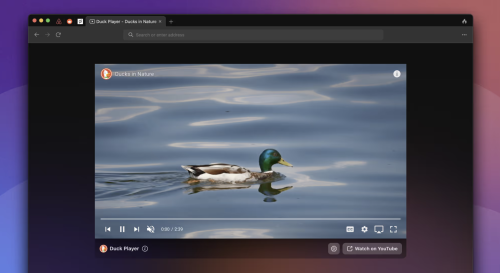 Best known for its search engine, DuckDuckGo has also created extensions, mobile apps, and now a desktop browser for macOS. As usually, the focus is on protecting the user’s privacy, but it also incorporates a bunch of innovative features that make browsing easier and more secure. DuckDuckGo is based on WebKit, ensuring great macOS integration and web compatibility. It’s intended to be lightweight and secure, freeing up valuable resources while also limiting tracking on the web. The app is still in Beta, with a lot of features yet to come, but it is already quite impressive. Privacy above allSimilar to the famous search engine, this browser was designed from the ground up to prevent you from being tracked across the web. It blocks trackers before they even load, ensuring that no information can be gathered if they were simply restricted. This serves to prevent many popular tracking methods that many other browsers have problems with. Aside from that, you have Global Privacy Control, automatic removal of tracking parameters from URLs, Google AMP protection, and CNAME cloaking protection. Smarter Encryption can ensure you visit the secure version of a website if you try to visit an HTTP link. Blocking trackers will greatly reduce the number of ads you see online, reduce load times, and limit resource usage. A lot of white spaces are left behind as a result of ads being blocked, but the team is working to get rid of these too. Duck Player — private YouTube playerGoogle is known for its bad privacy practices, but YouTube is difficult to avoid. If you want to watch something without being tracked, the browser can use its built-in player instead, which will get around ad personalization and get rid of most ads as a result. This is probably the best way to maintain your privacy on YouTube without actually leaving the website, and your views will also be counted. Let DuckDuckGo handle cookie consent promptsWhile better than not having them at all, cookie pop-ups are incredibly annoying. At least one or two clicks are normally required to choose the most private option, and that’s a lot of time wasted when visiting a new website. This browser is able to manage cookie prompts automatically, selecting the best option for you. Most popular sites are supported, but we still ran into quite a few that weren’t, so there’s more work to be done. Fire button for quickly clearing browsing dataDeleting browsing data takes more than a couple of clicks in most browsers, and it’s something many users do quite regularly. In DuckDuckGo, it only takes two clicks using a convenient button in the top-right corner. This is a very useful feature ported over from the company’s mobile browser. Of course, some cookies are necessary for signing in to a website, and you wouldn’t necessarily want to remove them. Thankfully, you can “Fireproof” them when signing in, which will prevent these cookies from being deleted when clearing browsing data. Very promising browser, and not just for privacy nerdsWhile you may be tempted to ignore DuckDuckGo if privacy isn’t too much of a concern, you really shouldn’t. It includes features that can make browsing easier for any user, with the added benefit of preventing tracking in the process. You can think of it as an upgraded Safari. The same minimalistic design and intuitive approach, but with a bunch of extra features that make your life easier and work behind the scenes to keep you anonymous on the web. Of course, DuckDuckGo is still in Beta, so it’s not quite complete yet. But if you’re willing to overlook some missing features, it definitely deserves a chance.
-
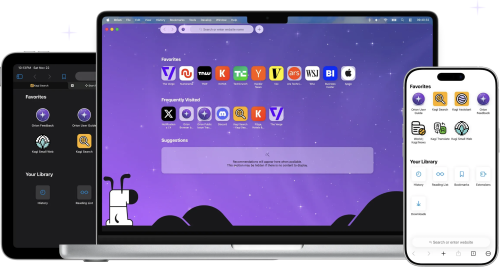 Orion — A web browser designed from the ground-up. Native WebKit speed, compatibility with a wide selection of extensions, and absolute privacy — finally together in one browser that respects you. Generally, users who want an alternative to Safari on macOS turn to either Firefox or a Chromium-based browser. There aren’t a lot of popular options based on Apple’s WebKit, which is a shame given how well the engine is optimized for macOS. That’s where Orion Browser comes in, one of the most promising browsers to be released in recent years. It uses WebKit and takes Apple’s commitment to privacy to a whole new level, while also offering a truly impressive list of features. It is meant to offer an alternative to Safari that improves upon it in every way, and it’s off to a good start. Privacy is the name of the gameOrion is committed to offering a truly private browsing experience. It records no telemetry, serves no ads (such as default bookmarks with affiliate links), and comes with built-in ad and tracker blockers. You can opt to use the company’s own Kagi search engine, a tracker-free alternative to Google or Bing, which is also not supported by ads. However, the free plan is limited to 50 searches per month, so a subscription is necessary to use it as your default search engine. Fast, lightweight, and familiar Safari alternativeOrion looks a lot like Safari at first glance, and that’s because it’s built on WebKit. Right off the bat, that will make the browser more efficient on macOS than competitors running on other engines. It’s also more streamlined than Safari, so it should be just as fast, or even faster. Since it’s based on the same technology, Safari users will have no trouble making the switch. The UI is very similar, and native macOS features like Keychain and Live Text are supported directly. All your data is synchronized via iCloud. Tons of quality-of-life featuresTabs can be shown either on top or on the side, the latter making it easier to manage multiple websites. Tabs can also be organized into groups, or windows. A handy button to the left of the address bar provides quick access to useful info, features, and settings for each website, and you can also view a quick privacy report, just like in Safari. Safari’s Reader mode is available, along with the new Focus mode, which hides every UI element from the browser window, leaving only the web page itself. You can float a window on top of all other apps, and the browser also has a built-in picture-in-picture mode for viewing videos on YouTube or other websites. There is a lot more to mention, such as the low power mode, the option to open a page in the Internet Archive, force copy & paste on pages that don’t allow it, and automatic blocking of video autoplay. Install Chrome and Firefox extensionsGiven the limited Safari extension catalog and Apple’s struggles with them, going as far as requiring you to install an entire app just to add a feature to the browser, being able to use Chrome and Firefox extensions is a very appealing prospect. These add-ons can be installed directly from their respective repositories, and the ones I’ve tried seem to work well. You can, for instance, bring back dislikes to YouTube with Return YouTube Dislike, an extension that is not available for Safari. However, keep in mind that the project is in its early stages, and a lot of extensions, particularly the less popular ones, are a bound to have issues. A real contender for Safari on macOSWhile still a public beta, Orion is already a very impressive browser. It offers the best privacy practices you can get from a WebKit-based browser, it equals or even beats Safari when it comes to speed, and it is packed with helpful features, including support for Chrome and Firefox extensions. Subscriptions are available for both the browser and search engine, but Orion+ doesn’t offer any benefits regular users will be interested in, so it is definitely not necessary. Kagi is almost unusable without a subscription, but there are a bunch of other privacy-friendly search engines you can use instead.
-
When most people think about the internet, they imagine websites like Google, YouTube, Instagram, and online newspapers. But beneath the internet we use every day lies a much less visible part of the web: the Dark Web. The Dark Web is a hidden part of the internet that cannot normally be accessed using ordinary browsers such as Chrome or Safari. Instead, special software is required to reach websites and services that operate there. One of the best-known technologies associated with the Dark Web is Tor, which was originally developed to provide greater privacy and anonymity online. What Is the Dark Web?The internet is often described as having different layers. The Surface Web contains websites that search engines can find and index. The Deep Web is much larger and includes things such as private databases, online banking systems, email accounts, and subscription-based websites. The Dark Web is a small part of the Deep Web that is intentionally hidden. It is designed to make it more difficult to identify users and website operators. This anonymity can have both positive and negative consequences. Why Does the Dark Web Exist?Privacy is one of the main reasons people use technologies connected to the Dark Web. Journalists, activists, whistleblowers, and people living under oppressive governments can sometimes use anonymous communication tools to share information without immediately revealing their identities. For example, a journalist may need to communicate with a confidential source. Anonymous networks can provide an additional layer of protection in situations where revealing someone's identity could put them at risk. However, the same privacy features can also be misused. The Dark Side of the Dark WebThe Dark Web has gained a reputation because of illegal activities that have taken place there. These have included stolen data, fraud, illegal marketplaces, and other forms of cybercrime. Criminal groups may attempt to use anonymity to hide their identities and activities. Law-enforcement agencies around the world therefore investigate parts of the Dark Web and have successfully shut down illegal services. It is important to remember that the Dark Web itself is not illegal. The technology can be used for legitimate purposes, just as ordinary internet technologies can be used for both legal and illegal activities. Is the Dark Web Completely Anonymous?Despite its reputation, the Dark Web does not provide perfect anonymity. Users can still make mistakes, reveal identifying information, fall victim to scams, or become targets of investigations. Security researchers and law-enforcement agencies have developed methods for investigating online criminal activity, meaning that people should not assume that using anonymous technology makes them impossible to identify. Why Should We Care?The Dark Web raises important questions about privacy, freedom of speech, cybersecurity, and law enforcement. How much privacy should people have online? How can journalists and activists communicate safely? At what point should governments intervene when anonymous networks are used for crime? There are no simple answers to these questions. The Dark Web is therefore more than just a mysterious corner of the internet. It is an example of how technology can have completely different consequences depending on how it is used. ConclusionThe Dark Web remains one of the most misunderstood parts of the internet. It can provide valuable privacy and anonymity, but it can also be exploited for criminal purposes. Understanding the Dark Web is not about exploring its most dangerous corners. It is about understanding the technology, the opportunities it creates, and the challenges it presents to modern society. In a world where more and more of our lives take place online, the debate surrounding privacy, anonymity, and security is likely to become even more important.
-
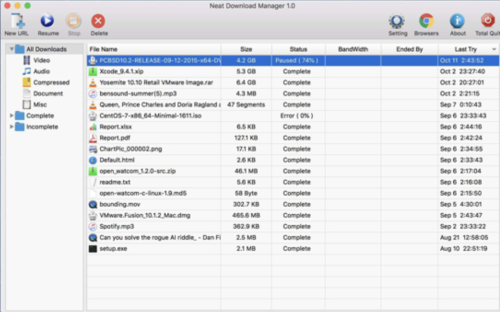 Uses an optimized Dynamic Segmentation Algorithm. Speeds up your Downloads up to your total available Bandwidth. Organizes your Downloads based on Download Status (Complete, Incomplete) And File Type (Video, Document , ...) Supports HTTP, HTTPS and FTP Protocols. Supports HTTP Proxy and SOCKS Protocol. Supports HTTP Authentication and Proxy Authentication (Basic, Digest, NTLM) Has Pause/Resume Capabilities and can resume crashed Downloads. Has Browser Extension that can send Download Links to it and helps you download Video/Audio from any WebSite. Lets you set Bandwidth Limit on your Downloads even when Download is in progress. Lets you set maximum Connection Number on your Downloads even when Download is in progress. Can download all .ts files of an HLS video and at the end merge all segments into a single .ts file. Can Renew expired Downloads. Works with Drag and Drop, just for Mac
-
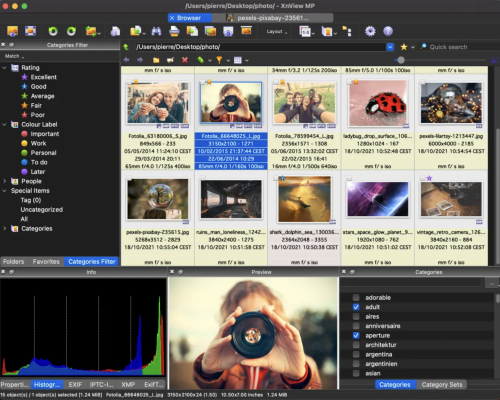 XnView MP/Classic is a free Image Viewer to easily open and edit your photo file. The Image Viewer supports all major image formats (JPEG, TIFF, PNG, GIF, WEBP, JPEG-XL, AVIF, HEIC, PSD, JPEG2000, OpenEXR, camera RAW, PDF, DNG, CR2). As Image Viewer you have features like color adjusting, image resizer, cropping, screen capture, metadata editing (IPTC, XMP) and much more. With its easy-to-use explorer-like interface, XnView MP allows you to quickly view your images and photos, but also to make image management. You have features like batch rename, batch converter, duplicate image finder, image compare, but you can also create contact sheets, slideshow. In addition to its viewing capabilities, XnViewMP includes tools for organizing and managing images efficiently. Users can create catalogs, apply tags, and even perform basic editing tasks. The program is free to use, making it an accessible option for anyone looking to enhance their image handling experience on Mac. Whether you need a simple viewer or a comprehensive image management solution, XnViewMP provides a robust set of features to meet your needs.
-
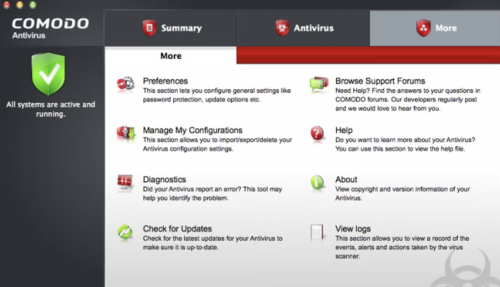 Comodo is a reliable firm that has been providing security software and firewalls for some time now for Windows based machines, and the offering for the Mac arena is a pretty good solution as well. Comodo Antivirus for Mac provides quality virus protection for your Mac computer. It features an on-demand scanner, 'always on' real-time protection and a continuously updated database of known viruses and threats. Key Features include: Automatic updates for the most up-to-date virus protection. Drag and drop any object onto the dock icon for instant virus analysis. Easy to use interface lets you install and forget: no annoying pop-ups or false alarms. Instant One-Click scanning. Simple slider to change your security level. User-friendly interface. Built in scheduler. On-access scanning The user interface of Comodo Antivirus for Mac is crisp and fairly pleasing on the eyes. It allows you to alter the settings as per your needs and requirements. All the usual features such as automatic updates, scan on demand, quarantine etc, are all available, just the same as they are on the Windows counterpart. Overall, Comodo Antivirus for Mac is a good, proactive solution for Mac computers. It provides a membrane of protection against viruses, worms and Trojan horses for Apple’s flagship operating system.
-
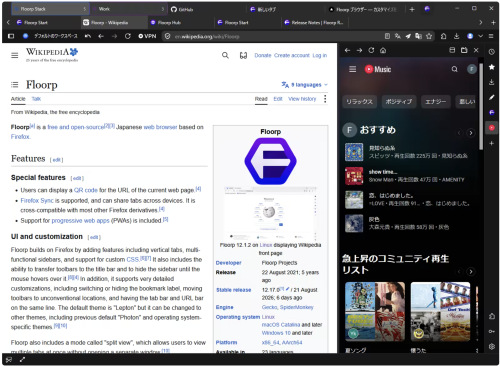 A free, open source desktop browser. No account needed to start. Group tabs by task. Assign Firefox containers when needed to keep cookies and sign-ins separate. Place several pages in one window to compare, research, and write at the same time. Adjust each panel to the width that works for you. Pin frequently used sites to the sidebar without leaving the page you are viewing. Notes and tools are ready when you need them.
-
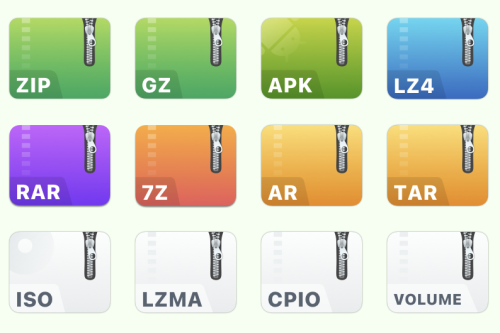 Supports more than 20 popular archive formats such as rar, zip, 7z, tar, gz, bz2, iso, xz, lzma, apk, lz4. Perfect handling of encryption and decryption! Easily protect private files, and it's safer and more worry-free after encryption. Feel free to drop to a third-party cloud disk, no longer afraid of privacy leaks! As long as you don't know your password, nobody can open "your" file! MacZip(named eZip in the past) does not charge user any fees, everyone can download and use it for free. If you feel good, remember to share it with your friends!
-
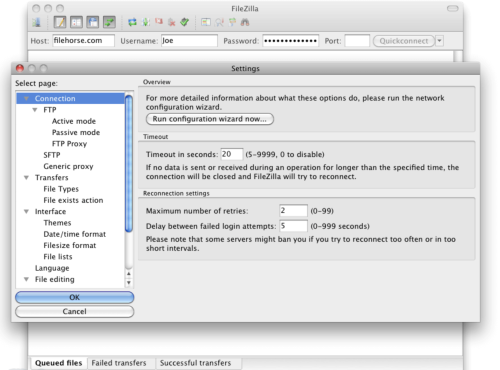 FileZilla for Mac is a popular and feature-rich free FTP client that offers users of all technical levels access to a wide range of features and tools for managing and transferring files over the local networks and internet via the popular FTP transmission protocol and its numerous variations. This software is available for Mac computers as a native app and is designed to enhance the workflow of home users, students, developers, and anyone else who needs to transfer files securely and efficiently. Today, this app is primarily used for uploading, downloading, and managing files on remote internet servers, but it can also be easily used for FTP connection between any supported modern devices inside the local network. It fully supports various file transfer protocols such as FTP, SFTP, and FTPS, ensuring secure connection, reliable file transfers, and an easy way to manage a large number of files and directories, with no limits being placed on file size or transfer speeds. The software also offers advanced features like synchronized directory browsing, directory comparison, remote administration, full IPv6 support, remote search and file editing, extensive local logging, and drag & drop support, making it an indispensable tool for managing files across different platforms. In addition to Mac, this app can be used on Windows and Linux computers, making it one of the most versatile free FTP clients available on the market. Main Features Comprehensive FTP Client – Complete supports FTP, SFTP, and FTPS protocols for secure file transfers. IPv6 Support – Fully compatible with IPv6, ensuring future-proof connectivity. Synchronized Directory Browsing – Empowers users to simplify directory navigation when managing multiple devices. Directory Comparison – Easily compare the contents of local and remote directories, highlighting differences in file size and modification time. Remote Administration – Manage system files, directories, and services remotely. Permissions System – Manage remote security access with user and group authentication. Large File Support – Reliably transfers larger than 4GB with no speed limits. Custom Speed Limits – Set custom speed limits for file transfers to manage real-time bandwidth usage. Installation and Setup To install this app on a Mac, users can download the Intel or ARM installer version from the official website or secure FileHorse servers and follow a few simple on-screen installation prompts. The entire installation process is straightforward and requires minimal technical expertise, enabling even complete novices to get this app up and running in a mere minute. What`s New in latest version 2026 Improved FTP, FTPS, and SFTP connection stability. Enhanced transfer speed optimization for large files. Updated TLS encryption handling for stronger security. Improved site manager with clearer connection profiles. Better handling of long file paths and large directories. Enhanced resume support for interrupted transfers. Improved compatibility with modern server configurations. Refined user interface responsiveness on Windows and macOS. Updated language files and localization support. Bug fixes and overall stability improvements. How to Use Once inside the app, users can configure this powerful FTP client by specifying a remote IP address, and remote client login details, and connecting to their FTP account on the server. Connections can be made either with the Quick Connect tool or the Site Manager feature that allows users to set up their most often-used connection parameters. Once connected, users can navigate through both local and remote directories, upload and download files, and manage permissions using the software's intuitive interface. User Interface The user interface of this app is designed to be user-friendly and intuitive, promoting four main on-screen modules. The top of the app is home for connection status listing where users can access all their currently active connection data or error codes. Below are two full sets of file management modules, and on the bottom is a transfer listing module that showcases what files are currently in status of transfer (with three tabs for Queued, Failed, and Successful transfers). The app also hosts a wide variety of other important tools, such as directory bookmarks, speed limiter, search tool, directory comparison tool, and many others.
-
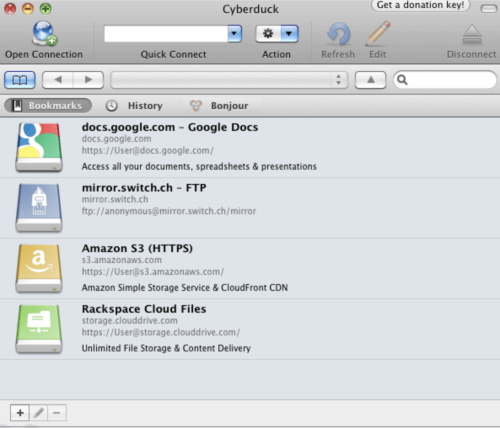 Cyberduck for Mac is an open source FTP, SFTP, WebDAV, Cloud Files and Amazon S3 browser for the Mac. It features an easy to use interface with quickly accessible bookmarks. The outline view of the browser allows to browse large folder structures efficiently and you can quickly preview files with Quick Look. To edit files, seamless integration with several external editors makes it easy to change content quickly. Both Amazon CloudFront and Cloud Files from Rackspace can be easily configured to distribute your content in the cloud. Many macOS core system technologies such as Spotlight, Bonjour and the Keychain are supported and a large number of translations makes you feel at home. Features and Highlights Connecting to every server With an easy to use interface, connect to FTP (File Transfer Protocol), SFTP (SSH Secure File Transfer), WebDAV (Web-based Distributed Authoring and Versioning), Amazon S3, Google Cloud Storage, Windows Azure, Rackspace Cloud Files and even Google Docs. Edit any file with your preferred editor To edit files, seamless integration with any external editor application makes it easy to change content quickly. Edit any text or binary file on the server in your preferred application. Distribute your content in the cloud Both Amazon CloudFront and Akamai content delivery networks (CDN) can be easily configured to distribute your files worldwide from edge locations. Connect to any server using FTP, SFTP or WebDAV and configure it as the origin of a new Amazon CloudFront CDN distribution. Amazon S3 for the rest of us Browse Amazon Simple Storage Service like your harddisk. Supporting the latest and greatest additions to the S3 storage options. Define website endpoints, enable access logging, configure storage class, encryption and bucket location. Manage your Google Docs Convert uploads to Google Docs format and Optical Character Recognition (OCR) for image uploads. Define access control lists to share documents with other users using Google login credentials. And many more (First class bookmarking, Browse with ease, Transfer anything, Advanced SSH features, Integration with system technologies). PROS User-Friendly Interface – Simple and intuitive design. Supports Multiple Protocols – FTP, SFTP, WebDAV & more. Seamless Cloud Integration – Works with AWS, Google Drive. Free & Open Source – No cost with active community support. Bookmark & Transfer Queue – Easy file management tools. CONS Slower Performance – Can lag with large transfers. Frequent Connection Drops – Stability issues at times. Limited Automation – No built-in scheduling feature. Annoying Donation Pop-ups – Requests for contributions. No Built-in File Editing – Requires external editors. Note: Requires 64-bit processor.
-
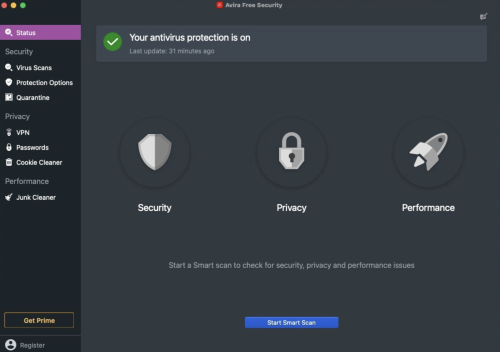 It has long been established that you definitely do need an antivirus on macOS. Malware that targets Apple's systems has grown increasingly common, as evidenced by the recent spread of a new virus that targets Apple's M1 devices exclusively. So if you're on the market for an antivirus, Avira is surely one of the first names to pop in your head. The company has a long history of providing reliable antivirus solutions, always ranking among the top contenders in independent comparative tests. On top of that, Avira Free Security comes with some additional features, such as a VPN, junk cleaner, and password manager. Industry-leading antivirus protectionUnlike their Windows counterparts, Mac users often have a hard time figuring out which antivirus offers the best protection. Expert comparative tests exist, but many macOS security solutions aren't included in these tests, largely due to a lack of demand. However, Avira has been included in comparative tests such as AV-TEST for years, and it has gotten a maximum protection score almost every time. If you're after the best security available, you can't really go wrong with Avira Free Security. While it lacks the web and mail protection features of Avira Antivirus Pro, both products use the same antivirus module. The app offers real-time protection, which can be disabled at any time from the system tray. You can also run a quick or full scan, but there is no option to scan a specific file or location on your Mac. Identified malware or suspicious items can be managed from the quarantine. Password manager and free (albeit limited) VPNUnsurprisingly, given that this is a full security suite, a password manager is also available. However, it must be noted that you can't access it from the main interface directly. Instead, it is opened in your default browser, and while extensions are available for Chrome and Firefox, that is not the case for Safari. Avira's Phantom VPN is included in this free security suite, but it must be installed separately, after setting up the main product. However, while it offers a decent number of locations and servers, the free version is limited to just 500 MB of traffic per month, making an upgrade to Phantom VPN Pro pretty much a necessity. Clean up junk files and reclaim disk spaceIn addition to protecting you against malware, Avira Free Security can prove helpful if you're trying to free up some disk space on your Mac. The app can remove cache files and reports and logs, as well as remove items from your Downloads folder and Trash. While the latter two can be done by any user easily, cache files and logs aren't easily accessible, so this feature can indeed be useful. If you're looking for a reliable free antivirus, this is itWhen it comes to protection against malware, Avira Free Security shouldn't let you down. It has a proven track record, and you can take advantage of the scanning and real-time protection modules for free indefinitely, making it a great choice for users who don't want to pay for an antivirus. The rest of the features included in the packages aren't as impressive. The free VPN is hardly usable without a subscription, and the password manager is only accessible via a browser, with no extension available for Safari users. The junk cleaner can at least help you get rid of some hard-to-find files.
-
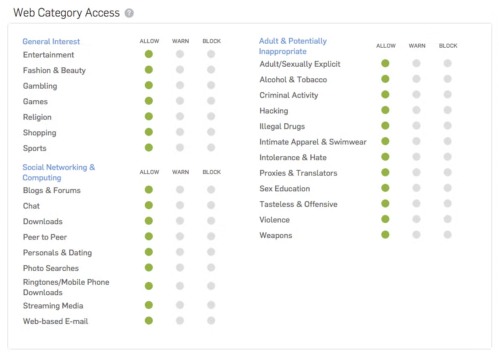 Sophos Home is a robust antivirus solution designed for home computers, offering comprehensive protection against online threats such as viruses, phishing scams, malware, exploits, and ransomware. Utilizing advanced artificial intelligence, it proactively detects and blocks malicious software while safeguarding users from risky websites. With a focus on security and privacy, Sophos Home stands out for its cutting-edge features and constant threat monitoring. Unique to Sophos Home is its next-generation artificial intelligence powered by deep learning, enabling preemptive virus detection and blocking. Trusted by global institutions, this AI continuously analyzes incoming files to ensure user safety. Sophos Home's vigilant surveillance, backed by SophosLabs, actively combats modern threats like ransomware, spyware, Trojans, and more, offering round-the-clock protection for home computers.
-
 Pixel-perfect precision. Select any part of your screen with intuitive guides and keyboard modifiers. Infinite screenshots. Capture entire webpages or long documents in one continuous motion. Annotate with speed. Add arrows, text, and highlights. Beautiful backgrounds in one click. Smooth capture. Record high-quality video with system audio and microphone support. Always at hand. Manage your recent captures instantly from the menu bar.
-
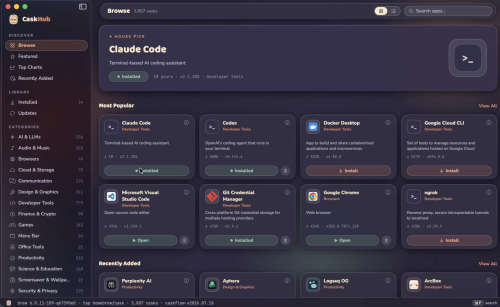 Browse, search, install, update, and uninstall thousands of Mac apps distributed through Homebrew, with original app icons, categories, popularity charts, and one-click actions, all in a native SwiftUI interface. Browse thousands of Mac appsCurated shelves, a rotating hero pick, a Featured top 100, and every cask classified into browsable categories. One-click everythingInstall, update, and uninstall with live progress states and cancellable downloads. pkg installers get a native macOS password prompt. And much more
-
 Homebrew for Mac is a free and open source package management system for macOS. Homebrew installs the stuff you need that Apple! Homebrew installs packages to their own directory and then symlinks their files into /usr/local. Homebrew won’t install files outside its prefix and you can place a Homebrew for macOS installation wherever you like. Trivially create your own Homebrew packages. It’s all Git and Ruby underneath, so hack away with the knowledge that you can easily revert your modifications and merge upstream updates. Making a cask is as simple as creating a formula. How to Use Install Command Line Tools Install Homebrew via Terminal Verify Installation Search for Packages Install a Package Update Homebrew Upgrade Installed Packages Remove a Package List Installed Packages Run Health Check
-
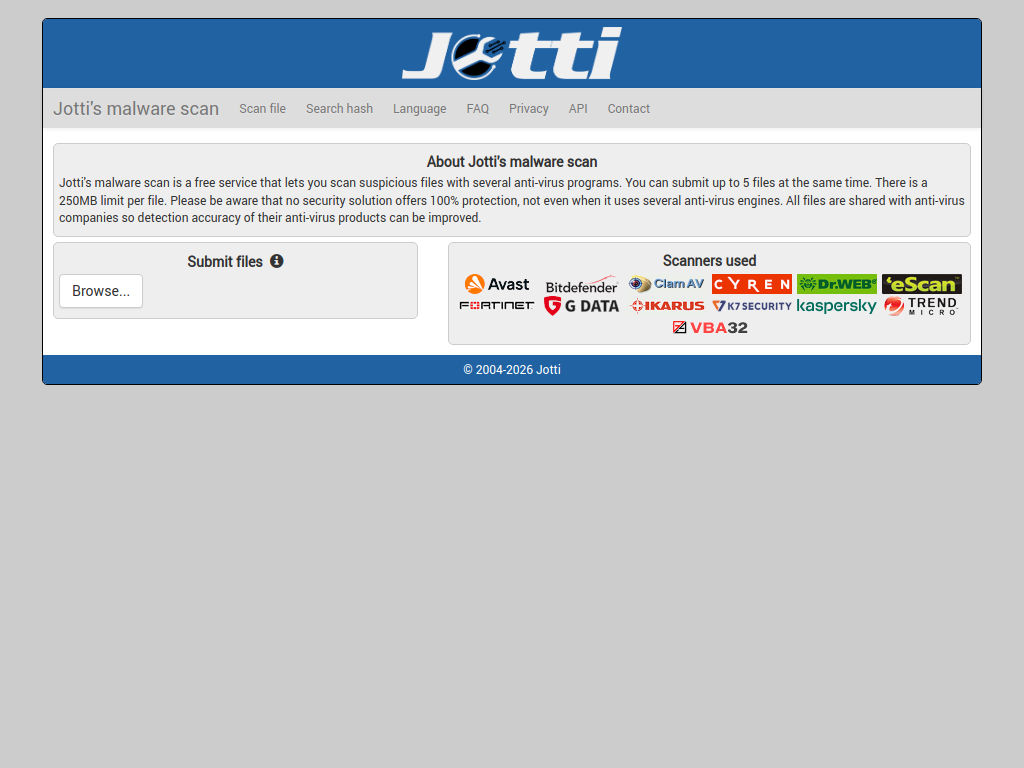 How it works: A lightweight, no-frills service that runs your uploaded file through several distinct antivirus engines (such as Avast, Bitdefender, ClamAV, and F-Secure). File size limit: Up to 250 MB (up to 5 files at a time).
-
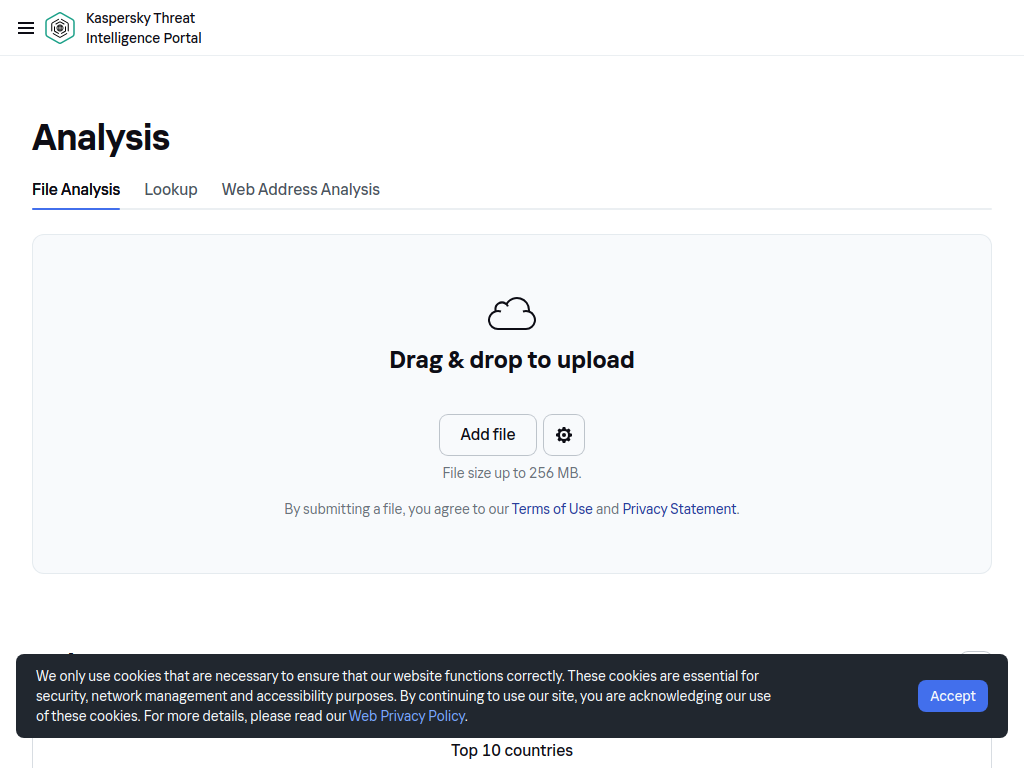 Upload a file to scan it directly against Kaspersky’s proprietary cloud threat database and heuristic analysis engines. File size limit: Up to 256 MB.
-
 Scans uploaded files with over 20 commercial antivirus engines. It also analyzes file vulnerabilities, sanitizes embedded malicious objects (Deep CDR), and checks file reputation.
-
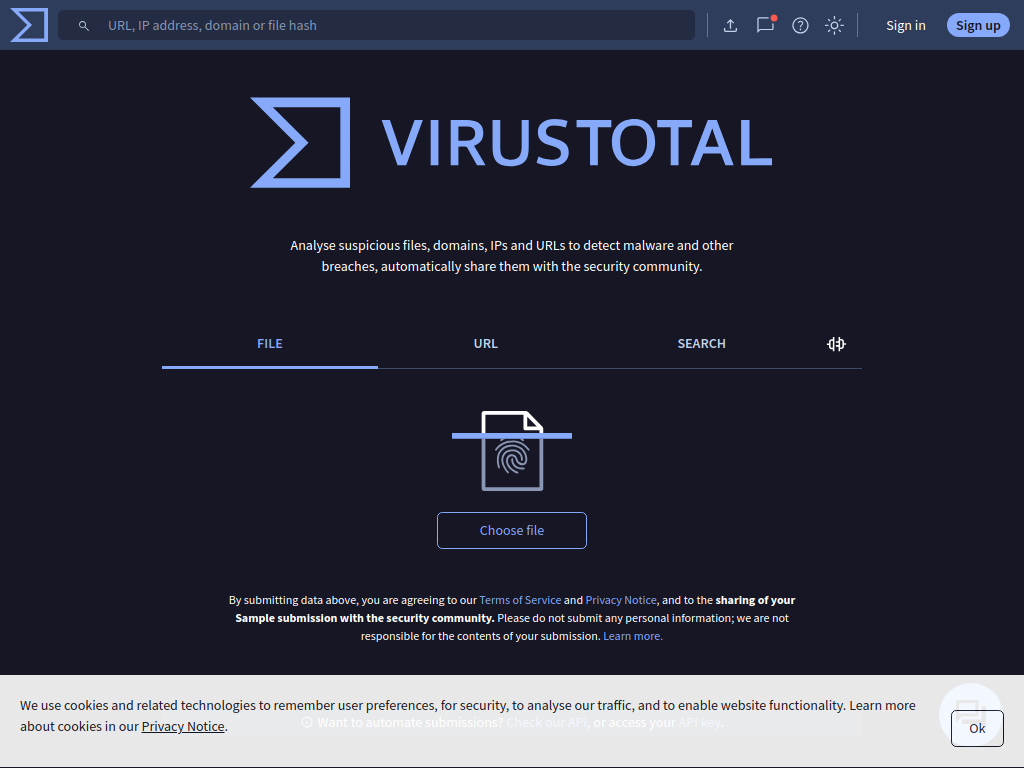 Analyse suspicious files, domains, IPs and URLs to detect malware and other breaches, automatically share them with the security community.
-
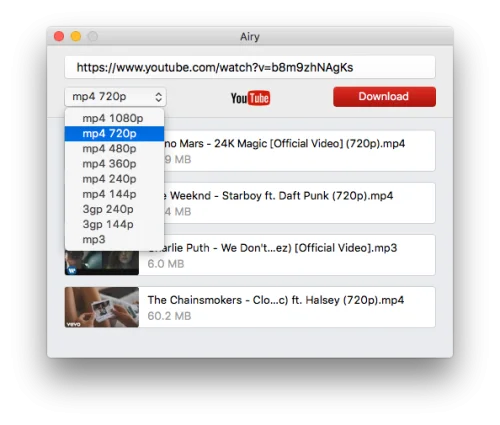 4k Video Downloader is a cost-free video downloader that is trusted by millions of users worldwide. It supports tons of popular video sites that enable you to save video and audio from YouTube, Vimeo, TikTok, SoundCloud, Bilibili, Flickr, Facebook, Instagram, DailyMotion, Naver TV, Likee, and Tumblr. Not to mention it allows you to download streams from Twitch and YouTube Gaming as well. This is a handy program to save data and watch your favorite content on the go. Enjoy offline streaming in the highest video resolution you want your viewing experience to have. Feature-packed video downloader4k Video Downloader empowers you to download special and private video content. For instance, your personal YouTube playlist can efficiently be accessed whenever and wherever you wish without being required to sign in. Stereoscopic 3D videos can also be obtained in MP4, MKV, FLV, 3GP, and other formats. Moreover, 360° videos can also be saved for a virtual reality experience. As its title suggests, the main function of this bundle is to give your clips a 4K quality offline streaming resolution. Aside from that, it permits you to download any video in other high-definition values such as 1080p, 720p, and even 8K. All of your downloaded videos and audios will be compatible on various devices including HD TV, iPad, iPhone, and Samsung. What's more amusing is it offers a built-in proxy setup that can authorize you to bypass restrictions set by your internet service provider. You can establish a connection through the in-app proxy in order to access and download from YouTube and other sites. Additionally, it is equipped with a smart mode feature wherein you can implement preferable settings to all further downloads. Watch favorites anytime, anywhere4k Video Downloader is an excellent download manager platform option to get your cherished content and watch it in quality offline. This will come in handy especially if you are running low on data or will go far away from a stable WiFi connection. With this powerful companion, no ads can ever interrupt your movie marathon time or binge-watching experience.
