
eivindsimensen
Administrators
-
Joined
-
Last visited
Files posted by eivindsimensen
-
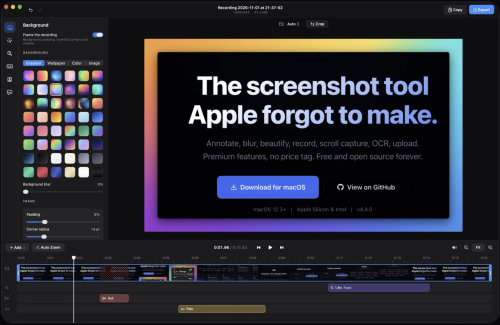
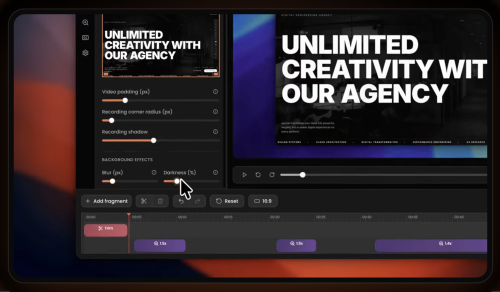
Annotate, blur, beautify, record, scroll capture, OCR, upload. Premium features, no price tag. Free and open source forever. Global hotkey freezes your screen. Select any region, snap to windows, or capture full screen. Multi-monitor support with cross-screen stitching. Click any annotation to select it, then edit stroke, style, color, and fill in real time. Full undo/redo. Rotate, resize, and reposition without switching tools. Select a region and scroll. macshot stitches it into one tall image with Apple Vision. Live preview updates as you scroll.
Record any area as MP4 (up to 120fps) or GIF. System audio, microphone, mouse highlights. Built-in trim editor. Pixelate, blur, solid fill, or erase. Auto-redact PII (emails, phones, API keys), detect faces and people. Erase mode intelligently matches surrounding colors. 30 gradient backgrounds including mesh gradients. macOS window frame with traffic lights, shadow, adjustable padding and corner radius.
Extract text with Apple Vision. Auto-detects all languages. Copy to clipboard, translate to 30+ languages, or search with Google AI. One-click upload to Google Drive, imgbb, or any S3-compatible service (Cloudflare R2, AWS, MinIO). Link copied instantly. Pure Swift + AppKit. No Electron, no web views, no bloat. Lives quietly in your menu bar.
- 3 Downloads
-
Zen Browser is a free, Firefox-based web browser designed for macOS, emphasizing speed, security, and user privacy. It features a customizable interface with options for light or dark themes, intuitive tab organization, and a workspace management system that enhances productivity. Users can easily manage multiple tabs and workspaces, making it ideal for multitasking. The browser also includes a unique split-screen feature for viewing multiple tabs simultaneously, as well as a compact mode for smaller screens.
One standout aspect of Zen Browser is its commitment to user privacy. It does not track online activity or collect user data, ensuring a secure browsing experience. Additionally, it enforces HTTPS connections for non-secure sites, further protecting users. The Zen Theme Store allows for extensive customization, with themes that enhance both aesthetics and functionality. Overall, Zen Browser offers a robust alternative to traditional browsers, prioritizing user control and security.
- 3 Downloads
-
Gimp is a fully-featured and versatile graphics manipulation packages that enables you to adjust and retouch photos and images with ease.
Comprehensive image editing application for novice and experience users
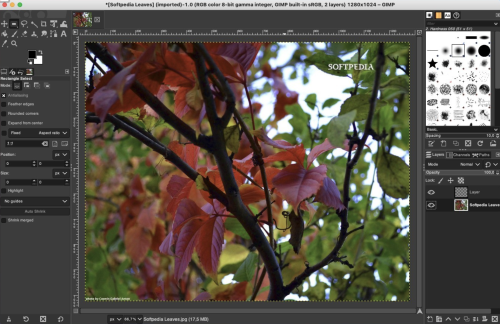
The first thing you’ll notice about Gimp, is that it comes with a customizable interface that can be changed and adjusted according to the task you need to perform. Hence, you can personalize the view and change the behavior accordingly.
Gimp allows you to change anything from widget theme, widget spacings and icon sizes to custom tool sets in the toolbox. The main window is composed of multiple modules called docks that you can stack up into tabs or keep them in their own window. You can even hide them and summon them with a key press.
Numerous out-of-the-box editing tools and photo enhancement functions
What is more, Gimp features a full-screen mode that enables you to preview your work and edit using your entire screen and with the help of the provided tools and functions. Consequently, you can fix and repair numerous digital photo imperfections, color aberrations and distortions.
Hence, you can fix perspective distortion generated by lens tilt by using the corrective mode from the transform tools. For example, the lens’ barrel distortion and vignetting are annoying issues that can be easily adjusted thanks to the powerful filter.
Take advantage of the support for the pressure and tilt sensitive tablets and let your creativity free
At the same time, the built-in channel mixer offers you the power and flexibility you need to enhance your Black and White photos and focus on specific areas. Gimp is also the perfect choice for professional photographers.
The advanced inbuilt photo retouching tools can help you remove unneeded details, touch up minor details and heal damaged portions of a picture. On top of that, Gimp is compatible with most common image formats such as JPEG, JFIF, TIFF, PNG and more.
All of the above, combined with the built-in support for a wide variety of input devices, make the Gimp app a must have for amateur and professional photographers.
- 4 Downloads
-
Promising, extensible screen capture utility with a focus on easily uploading and sharing images or videos, using Imgur or custom uploaders
macOS has a very capable and easy-to-use screen capture utility built right in, but third-party utilities can bring additional features, such as extra personalization, or instant media uploads.
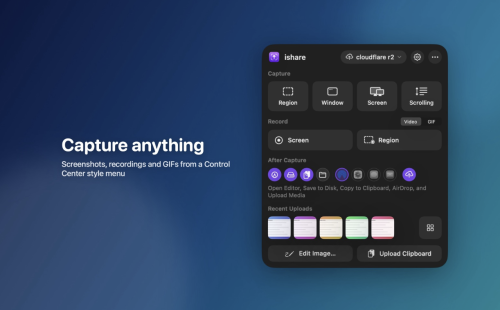
ishare is an open-source app that seems to be focused on making it easier to capture, upload, and share images or videos. The project is still in its infancy, with some features not fully implemented, but it already offers instant Imgur uploads of captured images.
Instantly capture and upload screenshots
The app only runs in the menu bar, and you can open the menu to check the default hotkeys and enable post media tasks. The settings window includes additional preferences, allowing you to change keybinds, the output location, and more.
Once you’ve captured a screenshot, the app can automatically upload it to Imgur and copy the URL to the clipboard. The process is seamless and great for quickly sharing something on your screen without any fuss.
Good feature set, with possible improvements
Looking past the upload functionality, we see a few missing features. While you can capture a region, window, or screen, there is no option to preserve or fine-tune the capture area, something you can do with the built-in utility.
The screen recording functionality allows you to capture any window or application, but you cannot record a specific area of the screen.
Use custom uploaders and plugins
One of the main advantages of ishare will be the ability to use custom uploaders and plugins for media processing. Uploaders can already be set up, with plugin specifications to be detailed in a later release.
Overall, ishare shows promise, but there is still work to be done. For now, if you just need a simple way to capture, upload, and share screenshots or video, it should work just fine.
- 3 Downloads
-
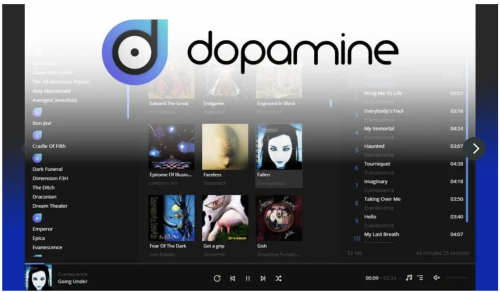
Free Download Dopamine's latest standalone offline installer for macOS. It is an audio player that tries to make organizing and listening to music as straightforward and pretty as possible.
Overview of Dopamine for macOS
It is a powerful music player designed to enhance your audio experience on macOS. This intuitive software boasts a sleek interface, advanced features, and seamless performance, making it an essential tool for music enthusiasts and professionals.
Features of Dopamine for macOS
Intuitive Interface
Dopamine features a clean, modern interface that is easy to navigate and use. Its minimalist design allows you to focus on enjoying your music without any distractions.
High-Quality Playback
Experience music like it was meant to be heard with Dopamine's high-quality playback. The software supports a wide range of audio formats, ensuring you can enjoy your favorite tracks in their best quality.
Advanced Audio Management
Organize your music library effortlessly with Dopamine's advanced management tools. Tag editing, album art retrieval, and intelligent playlists are just a few of the features that help you keep your collection in perfect order.
Customizable Skins
Personalize your music player with customizable skins. Dopamine allows you to change the software's look and feel to match your style and preferences.
Gapless Playback
Enjoy uninterrupted music with Dopamine's gapless playback feature. This ensures smooth transitions between tracks, providing a seamless listening experience.
- 0 Downloads
-
Tabs
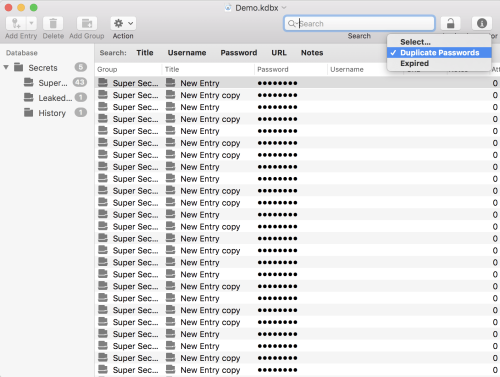
Open files in individual windows or use tabs to use a single window.
Autosave
Your files will get saved constantly. Lost something and cannot recover it from an entries history? Browse versions to find what you're looking for!
Undo/Redo
MacPass supports Undo/Redo for everything you do with your data. Something went wrong and you want to revert it, just undo your changes an you're good to go!
Drag & Drop
Move or copy entries and groups inside a database or between two files. Add file attachments by dropping them onto entries. You even can add entries by dragging URLs onto the database.
Quicklook
Enable previews to leverage the QuickLook system for previews of a variety of file types to take a look at your file attachments.
Autotype
Autotype enables MacPass to supply authentication credentials for any text based input. From webforms to authentication dialogs in any application. With Global Autotype you even can invoke Autotype from anywhere with a system wide shortcut. For more information please refer to the documentation. And much more
- 4 Downloads
-
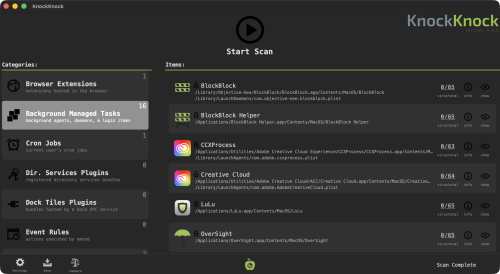
Who's there?", See what's persistently installed on your Mac! Malware often installs itself persistently, to ensure it is automatically (re)executed each time a computer is restarted. KnockKnock uncovers persistently installed software in order to generically reveal such malware.
Launching KnockKnock
To use KnockKnock, first download the zip archive containing the application. Depending on your browser, you may need to manually unzip the application by double-clicking on the zipped archive.
There is no need to install anything, and KnockKnock can be run from anywhere. (This also means there is nothing to uninstall, simple delete the application).
To run the application and begin a scan, simply double-click KnockKnock.app.
The first time you run KnockKnock, it may prompt you to grant it Full Disk Access (FDA), so it can scan your entire computer: Though the exact steps vary by macOS version, granting an app Full Disk Access is always done via System Settings. Simply search for Full Disk Access, scroll until you see KnockKnock and toggle it on. If it doesn’t appear, click the + button and add it manually by browsing to its location on disk.
Next, KnockKnock will show an initial configuration screen that lets you choose how it should run. All of these settings can be changed later in the app’s settings. Following this, you'll be able to provide a VirusTotal API key, if you want KnockKnock check for known malware: Want a free personal VT API key? See: "Please give me an API key".
- 3 Downloads
-
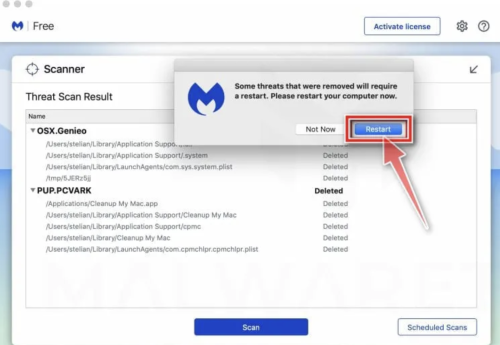
Is your Mac running slow? Annoying adware, like pop-ups, or malware could be the problem. Malwarebytes for Mac scans for and removes code that degrades system performance or attacks your system.
Making your Mac, once again, your Mac. What it does for you: Removes adware, such as Genieo, VSearch, and Vidx; Removes malware for Mac, including Trojans; Scans quickly; Simplifies program management through a clean, lean interface.
Malwarebytes Anti-Malware for macOS scans for and removes code that degrades performance or attacks your system! Proven Malwarebytes technology crushes the growing threat of Mac malware. So you are protected and your machine keeps running silky smooth.
What`s New
Latest macOS release adds a guided setup flow from trial to free version with customizable alert options.
Free users can now enable a monthly scheduled security scan with clear in-app guidance.
Malwarebytes for Mac gets smarter, deeper scan options with Quick, Threat, and Custom scan modes.
Mac updates also include significantly reduced CPU usage for lighter system impact and improved performance.
Expanded threat protection covers malware, ransomware, spyware, and malicious websites across devices.
Mobile Scam Guard helps identify and avoid phishing and scam content in messages and links.
Browser Guard extensions block ads, trackers, and scam sites for safer web browsing.
Improved phishing and scam research with Malwarebytes joining the Global Anti-Scam Alliance to better fight online fraud.
Real-time protection and advanced threat blocking available in Premium plans for ongoing security.
VPN integration support encourages users to add privacy protection alongside malware defenses.
What makes Malwarebytes for Mac different:
Protects you from Mac threats
Detects and removes viruses, ransomware, and other malware in real time with advanced anti-malware technology. Catches dangerous threats automatically, so you’re protected without having to even think about it.
Removes adware and unwanted programs
Crushes adware and potentially unwanted programs that slow your Mac. Your Mac experience will remain clean and pristine.
Scans Mac-fast
Scans the average Mac in under 15 seconds. Run the malware scanner in the background while you boot up your favorite game. It's done by the time you're ready to play.
Light and lean
Only the size of three digital music files. That means more disk space for your movies, music, and apps.
What`s New
Latest macOS release adds a guided setup flow from trial to free version with customizable alert options.
Free users can now enable a monthly scheduled security scan with clear in-app guidance.
Malwarebytes for Mac gets smarter, deeper scan options with Quick, Threat, and Custom scan modes.
Mac updates also include significantly reduced CPU usage for lighter system impact and improved performance.
Expanded threat protection covers malware, ransomware, spyware, and malicious websites across devices.
Mobile Scam Guard helps identify and avoid phishing and scam content in messages and links.
Browser Guard extensions block ads, trackers, and scam sites for safer web browsing.
Improved phishing and scam research with Malwarebytes joining the Global Anti-Scam Alliance to better fight online fraud.
Real-time protection and advanced threat blocking available in Premium plans for ongoing security.
VPN integration support encourages users to add privacy protection alongside malware defenses.
- 24 Downloads
-
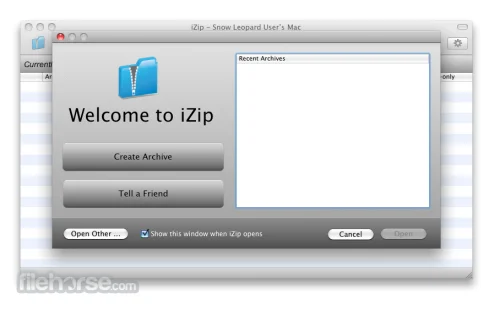
iZip supports all the major modern archive formats like ZIP, RAR, 7ZIP, TAR, BZ2 and XZ, including fully encrypted archives. Simply open an archive with iZip to quickly browse, view and extract.
iZip allows you to secure your archives with AES-256 encryption, while the Windows and macOS versions of iZip are completely interoperable, making transfers and collaboration easy.
iZip is completely free to download and use. There are no advertisements, spyware, time limits or other catches. We hope you love using it and tell all your friends!
You may choose to upgrade your copy to enable archive modifications or use it totally free to view and extract ZIP, ZIPX, RAR, 7Z etc.
- 13 Downloads
-
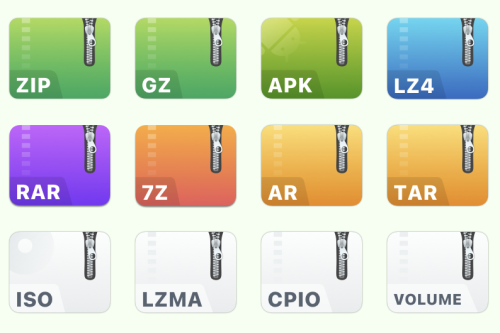
Supports more than 20 popular archive formats such as rar, zip, 7z, tar, gz, bz2, iso, xz, lzma, apk, lz4. Perfect handling of encryption and decryption!
Easily protect private files, and it's safer and more worry-free after encryption. Feel free to drop to a third-party cloud disk, no longer afraid of privacy leaks! As long as you don't know your password, nobody can open "your" file! MacZip(named eZip in the past) does not charge user any fees, everyone can download and use it for free. If you feel good, remember to share it with your friends!
- 18 Downloads
-
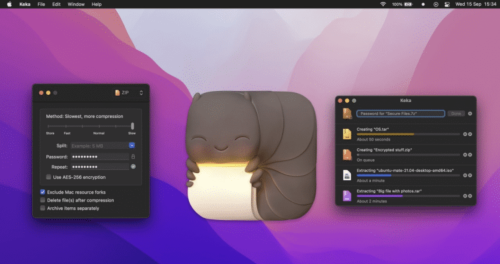
Keka for Mac is a versatile file archiver that offers users of all technical knowledge levels the ability to easily, quickly, and reliably compress and extract files in various supported formats.
It comes as a standalone tool that can be used inside a simple drag-and-drop UI interface and as a background service accessible from a command-based Terminal app.
This highly versatile approach makes it appealing to both novice and seasoned users, especially since it is completely free to use.
The app supports a wide range of compression formats (including the most popular ones Zip and 7Z), even more extraction formats (ZIP, RAR, TAR, and others), and can even manage ISO format for CD/DVD disc image archives, enabling users to quickly access this archived content without the need for cumbersome CD/DVD virtual drive apps.
However, users should be aware that this app supports much more extraction than compression formats, limiting its usefulness for users who want total control over their file management workflow.
Key Features
Compress files in popular archive formats such as 7Z, ZIP, TAR, GZIP, and others.
Extract files from 10+ popular compresses archive formats.
Full support for encryption using AES-256 standard.
A large array of advanced tools, including support for file splitting, compression strengths, separate item compression, and more.
Simple drag-and-drop interface for ease of use.
Full support for Terminal command access.
Installation and Setup
To install it, users simply must download the latest version of the installer from the official website, or the secure FileHorse servers. The developers actively support only the modern version of the app that receives regular updates on mac OS 10.5 or newer.
The legacy version of the app (for Mac OS X 10.4 and older) can be found on the official website.
Once installed, Mac users can also make the Keka app as their default extraction app, but this can only be achieved by downloading and installing a separate helper app called “KekaDefaultApp” from the official website.
Simply start the app and follow a few simple on-screen instructions to finish the procedure of elevating Keka to the position of primary compression file manager.
- 43 Downloads
-
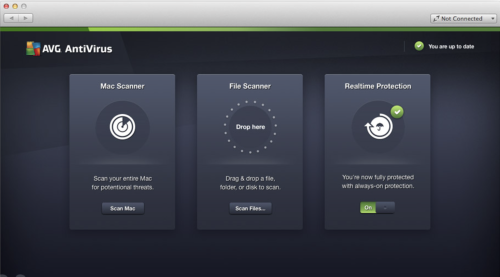
AVG AntiVirus Free for Mac is an Anti-Virus program which is absolutely free for non-commercial use for the life of the product. Created from the ground up to provide every Mac user brilliant protection during surfing, social networking and exchanging data with other people using portable USB storage devices.
AVG is quality Anti-Virus proven by over 250 million of users, who have used this software suite and the accompanying cloud services to protect PCs, Macs, mobile phones and tablets against any kind of online threat.
It even has integrated anti-theft tools that will enable you to locate your stolen hardware. Download, Install or Update AVG AntiVirus for macOS!
AVG continues to deliver essential free antivirus protection with the launch of AVG AntiVirus Free. It goes beyond simply detecting and removing viruses on your Mac by blocking infected links as you browse, checking files before they're downloaded, and helping protect your personal data online and on your Mac with enhanced privacy features.
AVG has improved core engine and its accuracy and included a new cloud-based detection method. And because security is just as important as usability.
What`s New in latest version 2026
Improved real-time threat detection with enhanced AI-based analysis.
Updated malware definitions for stronger protection against new threats.
Enhanced ransomware protection with better file shielding controls.
Improved Web & Email Shield for safer browsing and attachments.
Optimized performance with lower background resource usage.
Refined Smart Scan with faster and more accurate results.
Enhanced phishing detection and malicious link blocking.
Improved compatibility with the latest Windows updates.
User interface tweaks for clearer protection status overview.
Bug fixes and overall stability improvements.
Features and Highlights
Exceptional anti-virus protection
Anti-virus protection that automatically updates to protect you from continually evolving threats. As hackers develop new techniques, AVG’s research labs are constantly processing web data to provide new defenses to keep you automatically protected.
Gaming and surfing without interruptions
Get on with your surfing and gaming without interference. Scans operate when you are away from your Mac, and it also knows when you are gaming and ensures that the security operates in the background only, leaving you free to play.
- 25 Downloads
-
Give your demos the spotlight they deserve
Capptivo is a Screen Studio and Cursorful alternative. Create stunning screen recordings in seconds, not hours. With smart follow-cursor zoom and automatic zoom fragments, your demos practically make themselves.
Use a pen, highlighter, and simple shapes to explain a step, walk through a flow, or show what to look at. What you draw is saved in the recording, on top of the screen.
Before you open Capptivo on Mac
macOS builds are unsigned. If Gatekeeper blocks the app or you see “Application is damaged”, right-click → Open, or run this command in Terminal:
xattr -rd com.apple.quarantine /Applications/Capptivo.app- 5 Downloads
-
KeePassXC for Mac can store your passwords safely and auto-type them into your everyday websites and applications. You shouldn't waste your time trying to remember and type your passwords.
The thing computers can do best is storing information! Download KeePass Cross-Platform Community Edition now!
Encrypted
The complete database is always encrypted with the industry-standard AES (alias Rijndael) encryption algorithm using a 256-bit key. KeePassXC for macOS uses a database format that is compatible with KeePass Password Safe. Your wallet works offline and requires no Internet connection.
Cross-Platform
KeePassXC for Desktop is a community fork of KeePassX, the cross-platform port of KeePass for macOS. Every feature works cross-platform and was thoroughly tested on multiple systems to provide users with the same look and feel on every supported operating system. This includes the beloved Auto-Type feature.
Features and Highlights
Secure storage of passwords and other private data with AES, Twofish, or ChaCha20 encryption
Cross-platform runs on Linux, Windows, and macOS without modifications
File format compatibility with KeePass2, KeePassX, MacPass, KeeWeb, and many others (KDBX 3.1 and 4.0)
SSH Agent integration
Auto-Type on all supported platforms for automatically filling in login forms
Key file and YubiKey challenge-response support for additional security
TOTP generation (including Steam Guard)
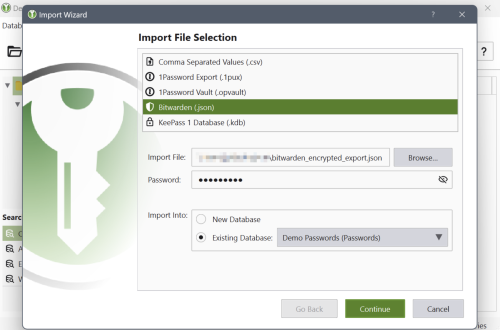
CSV import from other password managers (e.g., LastPass)
Command-line interface
Stand-alone password and passphrase generator
Password strength meter
Custom icons for database entries and download of website favicons
Database merge functionality
Automatic reload when the database was changed externally
Browser integration with KeePassXC-Browser for Google Chrome, Chromium, Vivaldi, and Mozilla Firefox.
(Legacy) KeePassHTTP support for use with KeePassHTTP-Connector available for Mozilla Firefox and Google Chrome, and passafari for Safari.
- 9 Downloads
-
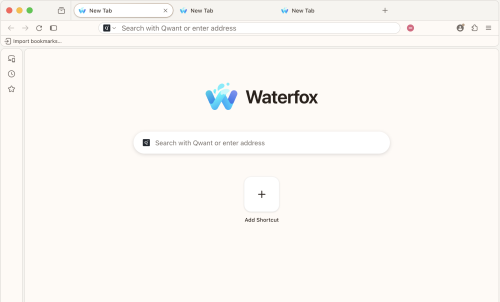
Waterfox for Mac provides you with a high-performance browser 64-Bit version of Mozilla Firefox. The Firefox source code was taken and compiled in order to specifically run for 64-Bit Mac computers.
To make Waterfox Current for macOS stand out from the crowd, it was compiled with many optimizations so that it will perform faster and more efficiently than simply compiling Firefox as a 64-Bit program. Download, Install or Update Waterfox for Mac!
Use this version of Waterfox Current if you want the latest and greatest the web has to offer, want to use all WebExtensions, and a few bootstrap extensions. Also, you can check the Waterfox Classic.
Now start up faster, tab hop quicker and scroll like a speed demon. The 100% fresh, free-range, ethical browser! The app doesn’t sell access to your personal information like other companies. In fact - it doesn't even collect any. From privacy tools to tracking protection, you’re in charge of who sees what.
Get more done
Now the browser for Mac is even faster – with quicker start ups and less hang time! That means windows and tabs load quicker for lightweight browsing that doesn’t hog your computer’s memory.
Get more privacy
To share or not share, that’s your call with the tool’s more powerful Private Browsing feature. It automatically blocks trackers and ads that collect your information without permission. The tool doesn’t sell access to your personal information like other companies. From privacy tools to tracking protection, you’re in charge of who sees what.
Get more freedom
Waterfox for macOS is more than just a browser. It fights to protect your online privacy and keeps corporate powers in check. Browse independently with this program!
More performance
"Bring it, Internet! We’ve spent the last year supercharging the tool's performance. Now start up faster, tab hop quicker and scroll like a speed demon."
Features and Highlights
Your favorite add-ons and extensions. Classic add-on archive coming soon! - Adblock, Ublock, LastPass and thousands more.
Customize your browser - Personalize twithe app h everything from themes to privacy tools.
Browse faster - Start faster, tab hop quicker, get more done.
Sync between devices - Get your tabs, logins and history on the go.
Tabs that travel - View open tabs on any device.
Waterfox for Android - The most customizable Waterfox for Android yet.
Balanced memory usage - Browse smoothly and leave plenty of memory for your computer programs.
Better bookmarks - Quickly save and organize your favorite sites.
Ad tracker blocking - Water fox Private Browsing blocks ads with trackers.
More powerful Private Browsing - More protection than Incognito mode or InPrivate.
More private - it doesn't sell access to your online data. Period.
No data collection - It has no need for your data, so you can browse freely.
Password Manager - Forget the reset. Save passwords and logins quickly.
Privacy-Focused & User-Friendly Browser
Built-in Tracking Protection – Blocks trackers by default for enhanced privacy.
Oblivious DNS – Hides website connections from your ISP for better anonymity.
Private Tabs – Browse privately without opening a separate private window.
Container Tabs – Organize browsing by separating work, shopping, and personal tabs with color-coded options.
Easy Switching – Import bookmarks, passwords, and settings from other browsers effortlessly.
No Data Collection – No telemetry; minimal data collection for updates and security only.
- 10 Downloads
-
Helium blocks ads and trackers, puts you in control, and has a clean, minimal interface. By default.
Skip the search engine
Browse the web even faster with !bangs. Built into Helium, processed locally, and routed directly to the website you want. Bang, clack, done.
Jump to thousands of websites without having to go through a page of search results.
Transparent and open source
All Helium components are open source and available on GitHub. Development happens in public, from commits to builds to releases.
You can build Helium yourself, self-host Helium services, fork or contribute to anything.
Use it, inspect it, modify it, or help shape where it goes next.
Helium never gets in your way and removes most of the noise on all web pages, so you can focus on what you came for.
Take a look yourself: drag the slider to see the difference between Helium and other browsers.
- 10 Downloads
-
A free, open source Chromium browser for Mac with an Arc style sidebar.
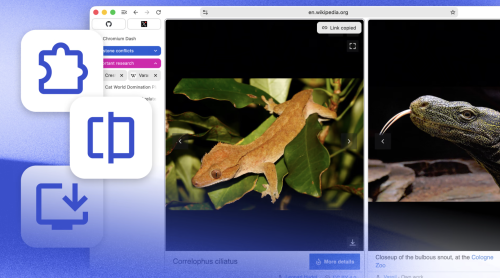
Ardia is a free, open source browser for Apple silicon Macs that pairs an Arc style sidebar with a polished interface on real Chromium. It ships with uBlock Origin built in, supports Chrome Web Store extensions, and can import your Arc data including Spaces. It also offers a Little Arc style quick window and encrypted iCloud Drive sync.
- 18 Downloads
-
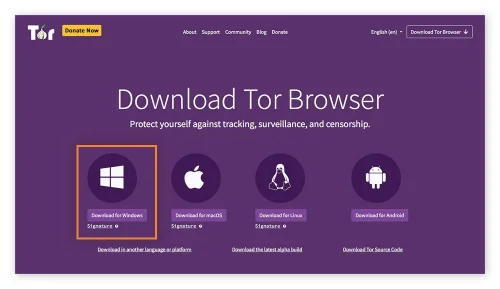
Tor Browser for Mac is a privacy-focused web browser that automatically routes users' web traffic through the secure network, providing anonymity and protection from user-monitoring services installed by internet providers, government agencies, and various online destinations.
It is designed to prevent tracking, surveillance, traffic analysis, and censorship, making it an ideal choice for users who prioritize online anonymity and privacy.
This highly secure web browser differs widely from other security-themed browser projects (such as Brave browser) by offering a whole another layer of added security that no other regular browser has.
This included a built-in triple-layer encryption procedure, use of IP masking service, built-in adblocker, and complete focus on not caching or recording any user activity locally.
The app focuses on routing data through a secure Tor network, a volunteer overlay network for anonymous communication.
This provides safe user access to the public internet, as well as the ability to access and browse illicit websites on the so-called “dark web”, a subset of the internet that is only accessible from inside a secure Tor network.
Today, more than two decades after it was originally released to the public, this unique browser app is viewed as a very important privacy platform that is used for both legitimate and illegitimate means. It is actively developed and maintained by the nonprofit organization The Tor Project.
What`s New
Updated Firefox ESR base for improved performance and compatibility.
Enhanced anti-fingerprinting protections to better prevent tracking.
Security patches addressing the latest vulnerabilities.
Improved circuit display for clearer connection transparency.
Refined connection settings with easier bridge configuration.
Better handling of onion services with improved reliability.
Updated NoScript integration for safer script control.
Performance optimizations for faster page rendering over Tor network.
Improved sandboxing for stronger isolation on desktop systems.
Various stability fixes and bug improvements across platforms.
Key Features
Private browsing of the public internet.
Built-in anti-monitoring features.
Multi-layered encryption.
Routing traffic through a low-latency volunteer network.
Protect private data against online fingerprinting and analysis.
Circumvent online surveillance.
Free for all users.
Installation and Setup
To get this app up and running on any modern Mac computer, users simply have to download an automated installer and follow a few simple on-screen instructions.
How to Use
This app features an extensive set of privacy and security features that make it unique in its category, but at first glance, it has a traditional web browser experience.
However, in addition to the use of standard HTTP online addresses, it can also handle direct loading of specific onion network links, accessing hidden “dark web” content hosted on a volunteer-based Tor network.
- 29 Downloads
-
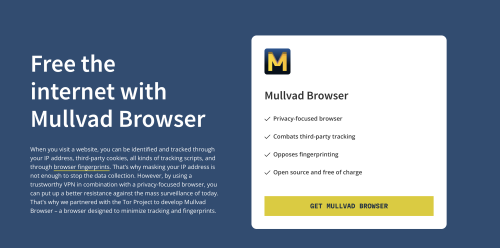
Privacy on the web seems less and less attainable, as you have to fight on multiple fronts just to stand a chance. Your browser itself is one of the primary sources of privacy leaks, and some, such as Chrome, are simply not built with privacy in mind.
Mullvad Browser will have a familiar name to some, as it was created by the makers of Mullvad VPN, in collaboration with the Tor Project. It’s essentially Firefox tuned for optimal privacy, with a few built-in extensions and other features, all privacy-related.
Ships a privacy-tuned version of Firefox
Given that, at first glance, it pretty much just looks like Firefox, it’s worth mentioning what’s actually changed. For starters, every privacy option available in the browser is set to its strictest setting, even those that aren’t easily configurable.
Private browsing mode is on by default, fingerprinting resistance is enabled, all telemetry is disabled, all recommendations are turned off, some built-in Firefox extensions are removed, DNS over HTTPS is enabled, and the default search engine is set to Mullvad’s Leta. You can’t set it to Google even if you wanted to, though it’s worth mentioning that Leta itself will be discontinued shortly.
Even your screen size can be used for fingerprinting, and Mullvad Browser gets around this by using a content window rounded to a multiple of 200 x 100 pixels, thereby preventing the use of very specific dimensions. This is actually a Firefox feature that isn’t enabled by default.
Built-in extensions and new features
uBlock Origin, NoScript, and Mullvad’s browser extension are pre-installed. You’re likely familiar with the first two, and the latter checks for DNS leaks, lets you verify connection details, and provides an easy way to connect to one of the company’s proxy servers. Keep in mind, this isn’t a VPN, just a proxy.
There’s also a new button in the toolbar that will instantly reset your online identity. When clicked, it will clear all private data and closes all tabs and windows. It essentially lets you avoid restarting the browser, but you’ll still need to use a proxy or VPN to change your IP address.
While the browser was developed in collaboration with the Tor Project, it doesn’t actually use Tor. The upside is that browsing is a lot faster, and together with a VPN, it’s probably as private as it can get without accessing the onion network.
Pimp My Firefox: Privacy Edition
Realistically, that’s what Mullvad Browser is: Firefox configured to maximize privacy, with a couple of new features and extensions built in. It’s great if you’re trying to avoid fingerprinting, but there are obviously some downsides to consider as well.
The biggest issue is that your logins will not be preserved between sessions, so it’s not suitable for most people and most use cases, though you can turn off private browsing if you want to. Letterboxing also makes browsing a bit awkward at times, and some websites fail to load properly with all privacy features enabled. Ideally, you’ll only use it when absolutely necessary, or if your main concern is privacy.
- 16 Downloads
-
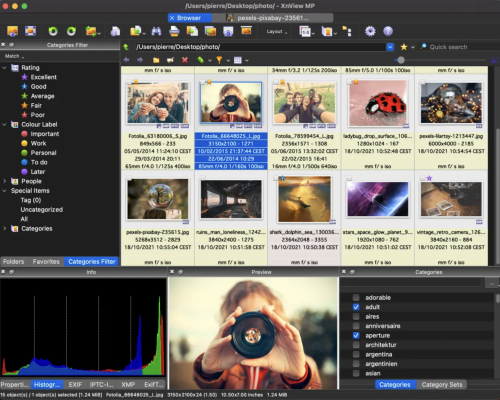
XnView MP/Classic is a free Image Viewer to easily open and edit your photo file. The Image Viewer supports all major image formats (JPEG, TIFF, PNG, GIF, WEBP, JPEG-XL, AVIF, HEIC, PSD, JPEG2000, OpenEXR, camera RAW, PDF, DNG, CR2). As Image Viewer you have features like color adjusting, image resizer, cropping, screen capture, metadata editing (IPTC, XMP) and much more. With its easy-to-use explorer-like interface, XnView MP allows you to quickly view your images and photos, but also to make image management. You have features like batch rename, batch converter, duplicate image finder, image compare, but you can also create contact sheets, slideshow.
In addition to its viewing capabilities, XnViewMP includes tools for organizing and managing images efficiently. Users can create catalogs, apply tags, and even perform basic editing tasks. The program is free to use, making it an accessible option for anyone looking to enhance their image handling experience on Mac. Whether you need a simple viewer or a comprehensive image management solution, XnViewMP provides a robust set of features to meet your needs.
- 27 Downloads
-
All the tools you need for
professional compositing
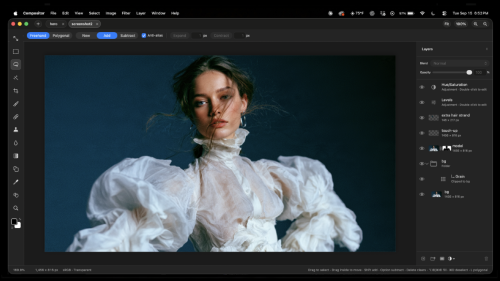
Adobe Photoshop costs too much and tools like GIMP don’t feel familiar enough for me to stay in flow. That’s why I built Compositor.
The goal was to create a full-featured image editor that is completely free and open source. I used to use Photoshop for compositing and post-processing, so Compositor is built around that workflow - with the tools needed to create a pixel-perfect final image.
Because it’s open source, you can download the Xcode project and add, remove, or modify any feature to fit your needs.
Layers
Layers and folders, with opacity and Photoshop's full set of blend modes in its order — a folder's opacity dims everything inside it
Layer masks: paint, fill, invert, blur and feather them anywhere on the canvas, past the layer's own pixels; link or unlink them to transform a mask on its own
Clipping masks and folder masks
Adjustment layers: Hue/Saturation, Levels, Curves, Exposure, Gradient Map, Grain, Black & White, Color Balance, Invert, Gaussian Blur, Motion Blur and Noise
Layer effects: Stroke, Drop Shadow, Color Overlay, Inner Shadow, Outer Glow and Inner Glow, rendered on the GPU and editable at any time
Merge Down, Merge Layers and Merge Group (⌘E)
Duplicate, rename inline, reorder and nest by drag and drop; Option-drag to duplicate; a right-click menu in the Layers panel
Copy and paste whole layers and folders (⌘C/⌘V with no selection), within a project or between projects, or drag them between projects
Transform
Non-destructive move, scale, rotate and flip — images keep their full resolution however small you make them
Free distort (⌘-drag a handle), with Shift to lock to an axis
Transform several layers, or a whole folder, together
Snapping to canvas and layer edges and centers, with guides
Exact values for position, size, scale and angle, stepped with the arrow keys
Flip Layer and Flip Canvas, horizontal and vertical
Selections
Rectangle and Ellipse Marquee, Freehand and Polygonal Lasso, and the Magic tool — Wand selects by color, Object traces whatever you click (Tab switches)
Select Subject, and Expand, Contract and Feather on any selection
Add to and subtract from selections, move the outline, or move and duplicate the pixels inside
Load a layer's pixels or a mask as a selection
Content-Aware Fill, which can also extend an image past its edges
Painting and retouching
Brush with size, hardness, opacity and smoothing, in Paint or Erase mode (B and E), and Shift for straight lines
Spot Healing Brush (content-aware)
Clone Stamp, aligned or not, sampling one layer or all of them
Blur tool, on pixels or masks
Gradient tool and Shape tool (rectangles, rounded rectangles, ellipses and lines), which stay editable rather than being rasterized
Type tool (T): inline multiline editing in draggable, resizable paragraph boxes; font, size, color, alignment and spacing in the tool header; transform text and use it as a clipping mask
Eyedropper and a full color picker
Adjustments and filters
Camera Raw filter: light, color, curves, color mixer, color grading, detail, optics and geometry, in a panel beside the canvas
Levels (with Auto), Curves, Hue/Saturation, Exposure, Gradient Map, Grain, Black & White, Color Balance and Invert
Gaussian Blur and Motion Blur that spread past a layer's edges
Add Noise, Vignette, Bloom / Glow, Tonal Contrast, Lens Correction and Remove Background
Live previews, limited to the selection when there is one
Canvas and files
Multiple projects in tabs
Rulers (⌘R), guides dragged from them, a layout grid with adjustable spacing and subdivisions, and Snap To for guides, grid, layers and document bounds
Crop with snapping, ratios including 3:4 and 9:16, and Option for symmetric cropping; with a selection, the crop starts at it
Canvas Size, Image Size and Trim
Sharp high-quality downsampling when zoomed out, and a pixel grid when zoomed in
Import JPEG, PNG, HEIC, TIFF, SVG, camera RAW (with a develop step first) and Photoshop PSD and PSB (8-bit RGB; not CMYK). Photoshop folders, masks, blend modes, fill rectangles/ellipses, and simple horizontal text stay editable; other vectors and vertical text become pixels. A conversion report is shown before anything is applied.
Large documents: the memory budget scales with your Mac, and a Photoshop file too big to open has its layers cropped to the canvas instead
Export JPEG with a live preview (⇧⌥⌘S); Copy Merged
Keep working while a project saves
Photoshop-style keyboard shortcuts throughout, remappable in Edit > Keyboard Shortcuts
Drag a number's label to scrub its value, as in Photoshop
Automatic updates, signed and notarized
- 27 Downloads
-
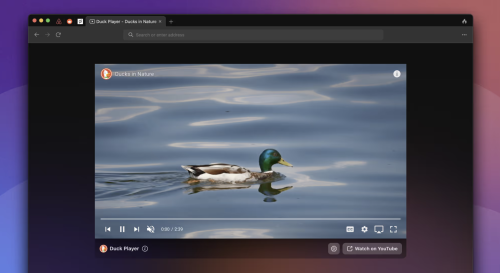
Best known for its search engine, DuckDuckGo has also created extensions, mobile apps, and now a desktop browser for macOS. As usually, the focus is on protecting the user’s privacy, but it also incorporates a bunch of innovative features that make browsing easier and more secure.
DuckDuckGo is based on WebKit, ensuring great macOS integration and web compatibility. It’s intended to be lightweight and secure, freeing up valuable resources while also limiting tracking on the web. The app is still in Beta, with a lot of features yet to come, but it is already quite impressive.
Privacy above all
Similar to the famous search engine, this browser was designed from the ground up to prevent you from being tracked across the web. It blocks trackers before they even load, ensuring that no information can be gathered if they were simply restricted. This serves to prevent many popular tracking methods that many other browsers have problems with.
Aside from that, you have Global Privacy Control, automatic removal of tracking parameters from URLs, Google AMP protection, and CNAME cloaking protection. Smarter Encryption can ensure you visit the secure version of a website if you try to visit an HTTP link.
Blocking trackers will greatly reduce the number of ads you see online, reduce load times, and limit resource usage. A lot of white spaces are left behind as a result of ads being blocked, but the team is working to get rid of these too.
Duck Player — private YouTube player
Google is known for its bad privacy practices, but YouTube is difficult to avoid. If you want to watch something without being tracked, the browser can use its built-in player instead, which will get around ad personalization and get rid of most ads as a result.
This is probably the best way to maintain your privacy on YouTube without actually leaving the website, and your views will also be counted.
Let DuckDuckGo handle cookie consent prompts
While better than not having them at all, cookie pop-ups are incredibly annoying. At least one or two clicks are normally required to choose the most private option, and that’s a lot of time wasted when visiting a new website.
This browser is able to manage cookie prompts automatically, selecting the best option for you. Most popular sites are supported, but we still ran into quite a few that weren’t, so there’s more work to be done.
Fire button for quickly clearing browsing data
Deleting browsing data takes more than a couple of clicks in most browsers, and it’s something many users do quite regularly. In DuckDuckGo, it only takes two clicks using a convenient button in the top-right corner. This is a very useful feature ported over from the company’s mobile browser.
Of course, some cookies are necessary for signing in to a website, and you wouldn’t necessarily want to remove them. Thankfully, you can “Fireproof” them when signing in, which will prevent these cookies from being deleted when clearing browsing data.
Very promising browser, and not just for privacy nerds
While you may be tempted to ignore DuckDuckGo if privacy isn’t too much of a concern, you really shouldn’t. It includes features that can make browsing easier for any user, with the added benefit of preventing tracking in the process.
You can think of it as an upgraded Safari. The same minimalistic design and intuitive approach, but with a bunch of extra features that make your life easier and work behind the scenes to keep you anonymous on the web.
Of course, DuckDuckGo is still in Beta, so it’s not quite complete yet. But if you’re willing to overlook some missing features, it definitely deserves a chance.
- 13 Downloads
-
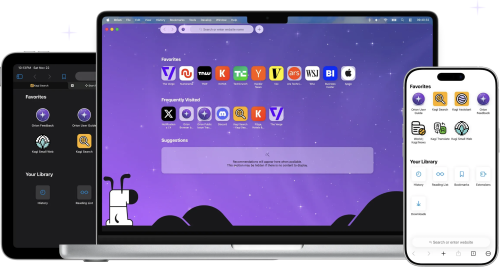
Orion — A web browser designed from the ground-up. Native WebKit speed, compatibility with a wide selection of extensions, and absolute privacy — finally together in one browser that respects you. Generally, users who want an alternative to Safari on macOS turn to either Firefox or a Chromium-based browser. There aren’t a lot of popular options based on Apple’s WebKit, which is a shame given how well the engine is optimized for macOS.
That’s where Orion Browser comes in, one of the most promising browsers to be released in recent years. It uses WebKit and takes Apple’s commitment to privacy to a whole new level, while also offering a truly impressive list of features. It is meant to offer an alternative to Safari that improves upon it in every way, and it’s off to a good start.
Privacy is the name of the game
Orion is committed to offering a truly private browsing experience. It records no telemetry, serves no ads (such as default bookmarks with affiliate links), and comes with built-in ad and tracker blockers.
You can opt to use the company’s own Kagi search engine, a tracker-free alternative to Google or Bing, which is also not supported by ads. However, the free plan is limited to 50 searches per month, so a subscription is necessary to use it as your default search engine.
Fast, lightweight, and familiar Safari alternative
Orion looks a lot like Safari at first glance, and that’s because it’s built on WebKit. Right off the bat, that will make the browser more efficient on macOS than competitors running on other engines. It’s also more streamlined than Safari, so it should be just as fast, or even faster.
Since it’s based on the same technology, Safari users will have no trouble making the switch. The UI is very similar, and native macOS features like Keychain and Live Text are supported directly. All your data is synchronized via iCloud.
Tons of quality-of-life features
Tabs can be shown either on top or on the side, the latter making it easier to manage multiple websites. Tabs can also be organized into groups, or windows.
A handy button to the left of the address bar provides quick access to useful info, features, and settings for each website, and you can also view a quick privacy report, just like in Safari.
Safari’s Reader mode is available, along with the new Focus mode, which hides every UI element from the browser window, leaving only the web page itself.
You can float a window on top of all other apps, and the browser also has a built-in picture-in-picture mode for viewing videos on YouTube or other websites.
There is a lot more to mention, such as the low power mode, the option to open a page in the Internet Archive, force copy & paste on pages that don’t allow it, and automatic blocking of video autoplay.
Install Chrome and Firefox extensions
Given the limited Safari extension catalog and Apple’s struggles with them, going as far as requiring you to install an entire app just to add a feature to the browser, being able to use Chrome and Firefox extensions is a very appealing prospect.
These add-ons can be installed directly from their respective repositories, and the ones I’ve tried seem to work well. You can, for instance, bring back dislikes to YouTube with Return YouTube Dislike, an extension that is not available for Safari.
However, keep in mind that the project is in its early stages, and a lot of extensions, particularly the less popular ones, are a bound to have issues.
A real contender for Safari on macOS
While still a public beta, Orion is already a very impressive browser. It offers the best privacy practices you can get from a WebKit-based browser, it equals or even beats Safari when it comes to speed, and it is packed with helpful features, including support for Chrome and Firefox extensions.
Subscriptions are available for both the browser and search engine, but Orion+ doesn’t offer any benefits regular users will be interested in, so it is definitely not necessary. Kagi is almost unusable without a subscription, but there are a bunch of other privacy-friendly search engines you can use instead.
- 12 Downloads
-
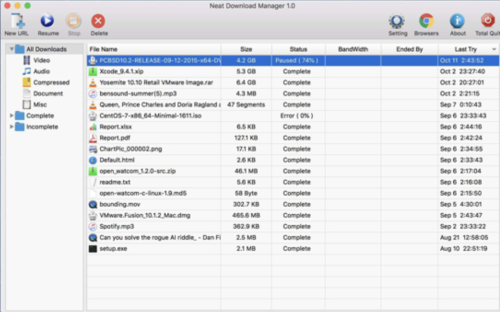
Uses an optimized Dynamic Segmentation Algorithm.
Speeds up your Downloads up to your total available Bandwidth.
Organizes your Downloads based on Download Status (Complete, Incomplete) And File Type (Video, Document , ...)
Supports HTTP, HTTPS and FTP Protocols.
Supports HTTP Proxy and SOCKS Protocol.
Supports HTTP Authentication and Proxy Authentication (Basic, Digest, NTLM)
Has Pause/Resume Capabilities and can resume crashed Downloads.
Has Browser Extension that can send Download Links to it and helps you download Video/Audio from any WebSite.
Lets you set Bandwidth Limit on your Downloads even when Download is in progress.
Lets you set maximum Connection Number on your Downloads even when Download is in progress.
Can download all .ts files of an HLS video and at the end merge all segments into a single .ts file.
Can Renew expired Downloads.
Works with Drag and Drop, just for Mac
- 12 Downloads
-
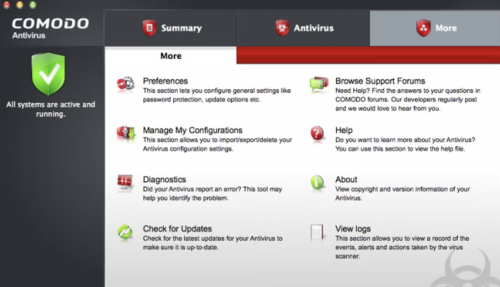
Comodo is a reliable firm that has been providing security software and firewalls for some time now for Windows based machines, and the offering for the Mac arena is a pretty good solution as well.
Comodo Antivirus for Mac provides quality virus protection for your Mac computer. It features an on-demand scanner, 'always on' real-time protection and a continuously updated database of known viruses and threats.
Key Features include:
Automatic updates for the most up-to-date virus protection.
Drag and drop any object onto the dock icon for instant virus analysis.
Easy to use interface lets you install and forget: no annoying pop-ups or false alarms.
Instant One-Click scanning.
Simple slider to change your security level.
User-friendly interface.
Built in scheduler.
On-access scanning
The user interface of Comodo Antivirus for Mac is crisp and fairly pleasing on the eyes. It allows you to alter the settings as per your needs and requirements. All the usual features such as automatic updates, scan on demand, quarantine etc, are all available, just the same as they are on the Windows counterpart.
Overall, Comodo Antivirus for Mac is a good, proactive solution for Mac computers. It provides a membrane of protection against viruses, worms and Trojan horses for Apple’s flagship operating system.
- 12 Downloads